
August 1, 2026
The FDM Printer Maintenance Schedule Manufacturers Actually Recommend
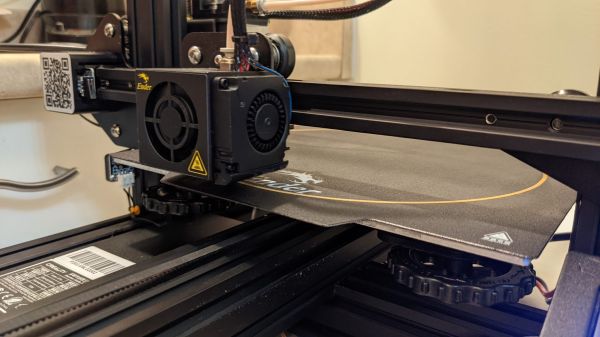
Most "maintain your printer regularly" advice online is vague enough to be useless. Manufacturers themselves publish something more specific: real service intervals, tiered by how hard the printer actually runs. This is the 3D printer maintenance schedule that comes out of that documentation — Bambu Lab's own maintenance documentation for the P1, A1, P2S and X2D series lays out a schedule like this, and it lines up closely with what shows up over and over in community threads about nozzle lifespan across other brands too — it's a reasonable baseline regardless of which printer is actually on your bench.
3D printer maintenance schedule at a glance
| Cadence | Task | Trigger |
|---|---|---|
| Weekly, or every 50–100 print-hours | Inspect and wipe the nozzle | whichever comes first |
| Monthly, under regular daily use | Lubricate X/Y-axis rails and belts | busier printers need it more often |
| Quarterly | Lubricate the Z-axis lead screw | |
| Ongoing, wear-based | Replace the nozzle | not a fixed interval — replace when worn, not on a date |
Weekly: nozzle inspection
A quick look at the nozzle tip and a wipe of any oozed plastic or carbon buildup, roughly weekly or every 50–100 hours of printing, whichever happens first. This is the cheapest, fastest item on the list, and the one most people skip precisely because nothing visibly breaks the first few times you skip it.
Monthly: rails and belts
X and Y-axis linear rails and belts want lubrication on roughly a monthly cadence under regular daily use — but "monthly" is really a stand-in for "after a certain number of running hours," and manufacturers who publish tiered schedules make that explicit: a printer running 5+ hours a day gets serviced more often than one that only sees occasional evening use. The exact tier boundaries vary by manual and printer generation, but the underlying principle is universal — base the interval on hours actually run, not on how many weeks have passed on the calendar.
Quarterly: Z-axis lead screw
The Z lead screw sees far less mechanical cycling than the X/Y rails, so it gets away with a longer interval — roughly quarterly. Skipping it for a cycle or two rarely causes visible problems immediately, which is exactly why it's easy to let slip indefinitely.
Nozzles wear, they don't expire on a schedule
Unlike the tasks above, nozzle replacement isn't calendar-based — it's wear-based. Community reports put a well-treated brass nozzle running standard filament (PLA, PETG) at low thousands of hours before wear becomes noticeable in print quality. Run anything abrasive — carbon-fiber or glass-fiber filled filament, glow-in-the-dark with metal particulate — and that number drops sharply, sometimes to a fraction of it. The practical takeaway: watch for the symptoms (below) rather than counting days, and keep a spare on hand if you print filled materials regularly.
What happens if you skip it
- Layer quality degrades first — inconsistent extrusion, rougher walls, small dimensional drift, usually the first sign something's overdue.
- Failure rate climbs next — a gritty, under-lubricated rail causes inconsistent motion, which shows up as layer shifts or missed steps on longer prints.
- Mechanical damage last — run a rail dry long enough and it scores the linear bearing itself, turning a five-minute lubrication job into a part replacement.
The order matters: quality issues are your early warning. Ignore them long enough and the bill goes from "a few drops of oil" to "new hardware."
The same schedule, very different calendar frequency
The interval is the same for everyone — it's the calendar frequency that isn't. A hobbyist printing five hours a week hits the 50–100 print-hour nozzle check every couple of months. A farm running two or three printers close to continuously hits the same threshold every few days. It's the same task at the same hour-based interval, but for a busy operation it stops being an occasional chore and becomes a routine operational procedure — because every hour a printer sits idle for overdue maintenance (or, worse, for an avoidable repair) is an hour it isn't billing.
Calculate your price in a minute
Free calculator: part weight, print time, material price — no sign-up needed.
 App Store
 Google Play
 RuStore
Track it automatically instead of by memory
For a single printer, remembering "it's been a while, I should check the nozzle" mostly works. Past a handful of machines, it stops working — which printer is actually due, and when, becomes exactly the kind of detail that falls through the cracks under order pressure. 3D Print Pricing already tracks each printer's accumulated print hours for depreciation purposes, and that's the same number that should drive maintenance reminders — both are fundamentally about hours run, not weeks elapsed. The app tracks per-printer maintenance status and reminders automatically off those tracked hours, so a busy farm doesn't have to hold the schedule in someone's head. See the full fleet view at /3d-printers.
Bottom line
There's a real, manufacturer-grounded schedule here, not guesswork: wipe the nozzle roughly weekly or every 50–100 hours, lubricate rails and belts monthly under regular use, lubricate the Z lead screw quarterly, and replace the nozzle when it wears out rather than on a fixed date. The interval doesn't change with how hard you run the printer — how often you hit it in real calendar time does, and a busy farm needs to treat this as routine, tracked operational work rather than something remembered when a print starts failing.