
October 7, 2026
G-code Analyzer Online: Filament Used, Print Time & Cost
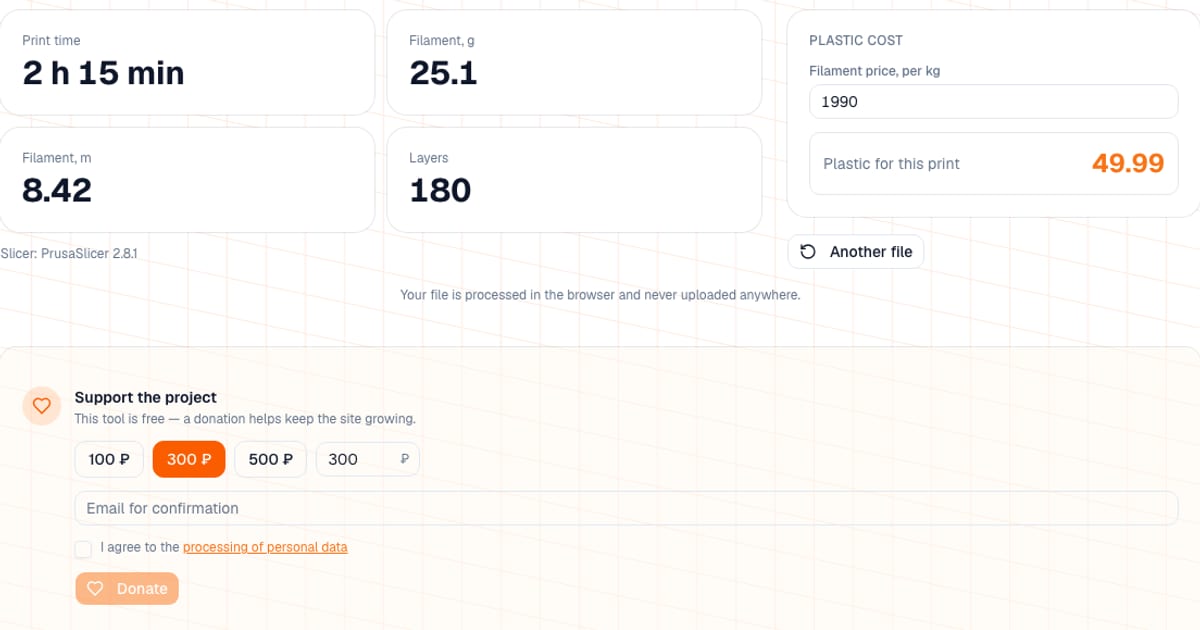
To get the print time and filament used from a finished G-code file, upload it to the G-code analyzer. In a second you get the print time, filament used in grams and meters, the layer count, the slicer that made the file, and the plastic cost at your price per kilogram. It is free, works in the browser without signing in, and the file (up to 100 MB) is never uploaded.
I built it for the situations where all you have is a .gcode: a customer sent it, it is sitting on an SD card or on a Klipper machine, and the slicer project is nowhere around. Then you do not have to guess how long it prints and how much plastic it will use.
How do I analyze a G-code file? Three steps
- Open the analyzer and drop a
.gcode,.gcoor.gfile (or click the box to browse). - Read the four big numbers: print time, filament in grams, filament in meters and layer count. The slicer that produced the file is listed below.
- In the "Plastic cost" block, enter your spool price per kilogram. The field is prefilled with 1990, so replace it with your own. The result is grams x price per kg / 1000; amounts under 100 are shown with two decimals (for example 8.57), larger ones as a whole number. No currency is attached, so you get the result in whatever currency you typed.
Small prints keep their cents: 85 g at 20 per kg shows as 1.70, and 600 g at 20 per kg shows as 12.00. The cost block appears whenever grams or meters were found in the file.
Where does the analyzer get its numbers?
First it looks for the metadata the slicer wrote into the comments. That data is as accurate as the slicer's own estimate. If there is no metadata, the analyzer calculates from the movement commands itself. A badge "estimated from moves" tells you which one you are looking at.
| Slicer | What is read from the comments |
|---|---|
| Cura | TIME:, Filament used: (in meters), LAYER_COUNT: |
| PrusaSlicer, SuperSlicer | estimated printing time, filament used [g], filament used [mm] |
| OrcaSlicer, Bambu Studio | the same, plus total estimated time, total filament weight [g], total filament length [mm], total layer number |
| Simplify3D | Build time:, Filament length:, Plastic weight: |
| Others | No metadata: counted from G0/G1 moves and E extrusion, flagged as an estimate |
If the slicer gave only a filament length, grams are calculated for PLA (1.24 g/cm3 density, 1.75 mm filament). If it gave only grams, the meters come from the reverse conversion using the same values.
How many grams is a meter of filament?
Useful for a back-of-the-envelope check and to see how far to trust a length-to-weight conversion. For 1.75 mm filament:
| Material | Typical density, g/cm3 | Mass of 1 m, g |
|---|---|---|
| PLA | 1.24 | about 3.0 |
| PETG | 1.27 | about 3.1 |
| ABS | 1.04 | about 2.5 |
| TPU | 1.21 | about 2.9 |
Density varies a little between brands, so treat these as approximate. The takeaway: for PLA and PETG the conversion error is small, while for ABS in "length only" mode the analyzer overstates the weight by roughly 15 to 20%. If the slicer wrote grams itself, there is no conversion at all.
What can I do with the results?
| Number | What to do with it |
|---|---|
| Print time | Multiply by the printer's power draw to estimate electricity; see how much electricity a 3D printer uses |
| Grams | Multiply by the price per gram to get material cost; compare with what is left on the spool in the filament remaining calculator |
| Layers | Sanity-check the layer height: a 60 mm tall model at 0.2 mm layers is 300 layers |
| Slicer | Confirm the file was sliced with the profile and printer you expected |
For a full cost (electricity, printer depreciation, labor, supports, post-processing, margin) read how to calculate 3D printing cost and use the calculator. The analyzer covers plastic only.
Example: from analyzer numbers to a price
Say the analyzer shows 2 h 40 min and 85 g. The spool costs $20 per kg, the printer draws about 120 W on average, and electricity is $0.15 per kWh (all figures illustrative; plug in your own).
| Item | Calculation | Total |
|---|---|---|
| Plastic | 85 g x $20 / 1000 | about $1.70 |
| Electricity | 2.67 h x 0.12 kW x $0.15 | about $0.05 |
Electricity barely registers on a print like this, while plastic, printer wear and your own time do. That is why the analyzer is a first step rather than a final cost: carry the result into a calculator together with depreciation, labor and margin.
What are the limits and pitfalls?
- The estimate from moves is rough. Time is calculated as distance divided by feed rate plus 10% for acceleration, and 1500 mm/min is assumed until the first F command. Only positive E feed on moves that travel in X/Y counts as extrusion: retractions, the un-retract moves after them and pure extruder-only moves are ignored, M82/M83 modes and
G92 E0resets are honored, and G10/G11 firmware retracts are skipped. It is still a simplified model (for example, prime lines are left out). Treat these numbers as an order of magnitude, not an exact value. - Multiple filaments. In multicolor files the usage is written as a list with one value per filament (for example
filament used [g] = 3.7, 0.6, orFilament used: 1.2m, 0.5min Cura with two extruders). The analyzer adds all the values up and shows the total, with no per-filament breakdown. Grams are not adjusted for each material, so compare the total with the slicer's summary. - Slicer time versus real time. Bed heating, pre-print calibration, pauses and the printer's real acceleration can add time. The analyzer shows what the slicer calculated.
- Not G-code. If you upload another file type you get "Couldn't parse the file — is it really G-code?".
- Project files. Only
.gcode,.gcoand.gare accepted. A sliced.3mffrom Bambu Studio should first be exported as plain G-code. - No toolpath, no per-color breakdown. This is not a toolpath viewer. For a layer-by-layer preview use a slicer.
When should I use something else?
- The slicer itself (PrusaSlicer, OrcaSlicer, Bambu Studio, Cura) shows the same numbers right after slicing, plus a layer preview. If the project is open, look there.
- Klipper interfaces (Mainsail, Fluidd) and OctoPrint show file metadata on the printer, and Spoolman helps with spool tracking.
- This analyzer is the convenient one when all you have is the file: no slicer, nothing to install, and a quick conversion into money. For the one-off question "what does this cost in plastic" it is enough.
What next?
To turn time and grams into a price for a customer, open the calculator or the electricity cost tool. For models that are not sliced yet, the overhang checker shows in advance how much of the model may need supports, and so how much plastic will go into them.
Frequently asked questions
- How do I find the print time and filament used from a G-code file?
- Upload the .gcode to the analyzer. It reads the figures from the slicer's comments and shows print time, filament used in grams and meters, and layer count. If the slicer left no metadata, the values are calculated from the moves themselves and flagged as an estimate.
- Which slicers does the G-code analyzer recognize?
- Cura, PrusaSlicer, SuperSlicer, OrcaSlicer, Bambu Studio and Simplify3D: the data is read straight from the comments in the file. Files from other slicers are analyzed from the G0/G1 moves and the E extrusion values.
- Where is the filament used (gcode filament used) written in a G-code file?
- Usually in comments at the start or end of the file: PrusaSlicer and OrcaSlicer write lines such as filament used [g] and filament used [mm], and Cura writes a Filament used line in meters. The analyzer finds them for you and converts to grams and meters.
- How accurate is the filament weight?
- If the slicer wrote grams, its value is used, which reflects the material you selected. If only the length is available, the weight is calculated for PLA at 1.24 g/cm3 and 1.75 mm filament, so other materials will be approximate.
- Can I get the cost of a print from a G-code file?
- The analyzer calculates the plastic cost: grams multiplied by the price per kilogram that you enter (prefilled with 1990). It does not include electricity, machine wear or labor, so for a full cost use a calculator.
- Is there a file size limit for G-code?
- Yes, 100 MB, with the extensions .gcode, .gco and .g.
- Is my G-code uploaded to a server?
- No, the file is analyzed in your browser and never uploaded. No sign-in is needed.