
October 7, 2026
Photo to Lithophane Generator: Free Online STL Maker
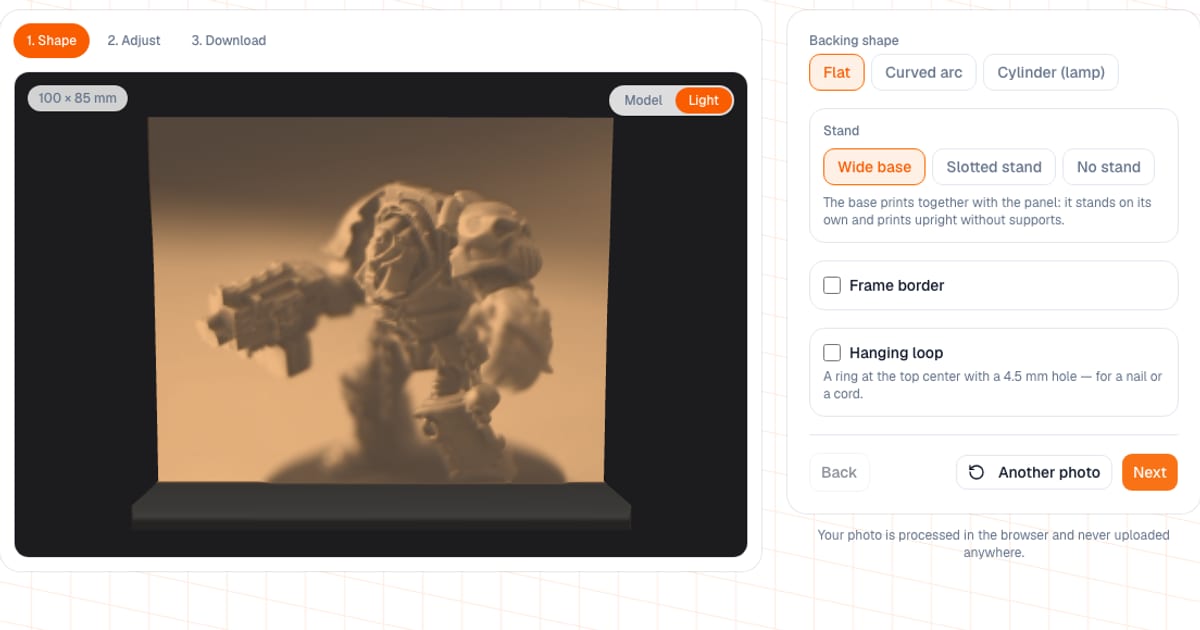
A lithophane is a panel whose thickness follows the brightness of a photo: thin areas let light through, thick areas block it, and the picture appears when you light it from behind. The lithophane generator turns a JPG, PNG or WebP photo into an STL or 3MF file in your browser, for free. Setup and the backlit preview work without signing up; to download the file you need a free email sign-in.
I built this editor so you don't have to hunt for slicer plugins or guess the thickness. Below: what it lets you adjust, which values to use, and how to print so the picture doesn't come out muddy.
How do I turn a photo into a lithophane online?
- Open the generator. Until you load a photo, the preview shows a soft placeholder blob, so you can try shapes right away.
- Upload your photo. High-contrast shots work best: close-up portraits, silhouettes, objects on a plain background.
- "Shape" step: flat panel, arc or cylinder, plus a stand, frame and hanging loop.
- "Adjust" step: rotate, crop, mirror, auto levels, size, thickness, brightness, contrast, gamma. Turn on "Backlighting" to see how the lithophane looks lit from behind.
- "Download" step: STL or 3MF, dimensions, triangle count and filament weight.
What can I adjust?
| Setting | Default | Range |
|---|---|---|
| Width | 100 mm | 30–300 mm |
| Height | follows the photo's proportions | 20–300 mm |
| Min thickness | 0.8 mm | 0.4–3 mm |
| Max thickness | 3 mm | 0.8–6 mm, always at least min + 0.4 mm |
| Brightness, contrast | 0 | −100 to 100 |
| Gamma | 1 | 0.3–3 |
| Arc angle | 120° | 20–350° |
| Frame width and depth | 4 mm and 3 mm | 2–20 mm and 1–15 mm |
Also available: invert (on by default, so dark areas are thicker; that is how a classic lithophane works, not a bug), mirror, 90° rotation, crop to 1:1, 4:3, 3:4, 16:9 or the full photo, auto levels (stretches the photo's tones over the full thickness), and smoothing for noise and JPEG artifacts. Transparent PNG areas count as white, meaning thin. The model is capped at 300 mm on any axis and scaled down if it would be larger.
What thickness should a lithophane be?
Start with a 0.8 mm minimum and a 3 mm maximum. The picture's contrast comes from the difference between them, so the generator won't let the two get closer than 0.4 mm: otherwise nothing would show against the light.
- Minimum under 0.8 mm. Bright areas come out 1 to 3 layers thick, show holes in the light, and the panel gets fragile. The generator warns you.
- Maximum over 3.5 mm. Dark areas barely pass any light and the picture turns gloomy. Also a warning.
- Lit by an LED panel or a window. Keep the maximum at 2 to 2.5 mm or less, or the bright areas will go dim.
Flat, arc or cylinder: which shape?
| Shape | Good for | How to print |
|---|---|---|
| Flat + wide base (default) | Desk panel that stands by itself | Upright; the base prints with the panel, no supports |
| Flat + slotted stand | Same, with the stand as a separate part | Panel upright, stand lying next to it (same file); slot 6 mm deep, 0.3 mm clearance |
| Flat, no stand | Wall frame or window | Upright; you can add a frame and a hanging loop (4.5 mm hole) |
| Arc 20–350° | A picture with depth | As downloaded, upright; diameter = 2 × width / angle in radians (100 mm at 120° gives about 95 mm) |
| Cylinder 360° | Lamp shade | As downloaded, upright; diameter = width / π |
If you turn off both the stand and the frame, a flat panel ends up standing on an edge as thick as the maximum relief thickness. It can wobble while printing, and the finished piece won't stand. The generator warns about this as well.
How do I print a lithophane?
- Filament: white or natural PLA, white PETG is fine too. Colored filament tints and blocks the light.
- Infill: 100%.
- Layers: 0.1–0.15 mm, and slower than usual: detail matters more than time.
- Orientation: print a flat panel upright, on its edge.
- Mesh and nozzle: on Standard the mesh step is 0.5 mm, which a 0.4 mm nozzle can print. A step finer than 0.3 mm is beyond the nozzle and only makes the file heavier.
- Backlight: even light from behind. Use LED panels, strips or bulbs: PLA softens at roughly 55 to 60 °C and an incandescent bulb can warp it.
The "Light" preview computes each point's brightness from the plastic thickness (the Beer–Lambert law) and lets you choose white PLA, natural PLA, white PETG or white resin, and warm, neutral or cool light (about 3000, 4000 and 6500 K). It is an estimate: the coefficients were tuned against photos of 0.8/3.0 mm lithophanes, and your real result depends on your filament and lamp.
How much filament does it use?
The generator shows weight as volume × 1.24 g/cm³ (PLA density). As a rough check, a 100 × 100 mm panel with an average thickness of about 2 mm (a photo of average brightness) is around 20 cm³, and the wide base, 35 mm deep and 5 mm high, adds about 17 cm³. That is roughly 45 g of PLA, or about $0.90 at $20/kg. See the exact number on the Download step; the "Estimate the cost" button opens the calculator with that weight.
Common mistakes
- Too few pixels in the photo. The photo's width in pixels should be at least the number of mesh nodes across: width in mm times 1, 2, 3 or 4 (Fast, Standard, Detailed, Maximum). A 150 mm panel on Standard needs at least 300 px across, otherwise the image is stretched and blurry.
- Maximum mesh quality for no reason. Its 0.25 mm step is finer than a 0.4 mm nozzle prints. Standard or Detailed is enough. On large panels the node count is capped at 160,000 (about 32 MB as STL) and the step grows by itself.
- A dull photo. Turn on auto levels or raise the contrast.
- A stretched picture. If you uncheck "Maintain image proportions" and set a different height, the photo is stretched. Pick the crop first. A 4 × 6 in print is about 100 × 150 mm.
- Printing it flat on the bed. The layers then smear the relief.
How does this compare with other lithophane makers?
Online tools such as ItsLitho can make lithophanes, slicers have modes for it (in Cura you can open an image as a lithophane), and color lithophanes (CMYK, HueForge) are made in Bambu's MakerLab and in HueForge itself.
- When ours is more convenient: you want a quick single-color lithophane with a stand, frame or loop, an arc or a cylinder, and a backlit preview with a choice of filament and light. The photo stays in your browser.
- When something else is better: you want a color lithophane on several filaments, a night-light box with a housing for a lamp, batch processing of dozens of photos, or full manual control in Blender or CAD.
If you want a lamp shade with a proper frame for a socket, see the lamp shade designer. Before printing, you can open the STL in the model viewer, and for the material choice see PLA vs PETG vs ABS vs ASA.
Frequently asked questions
- How do I turn a photo into a lithophane for free?
- Open the lithophane generator, upload a JPG, PNG or WebP photo, pick a shape and thickness, check the backlit preview and download an STL or 3MF. Setup and preview are free with no sign-up; downloading the file needs a free email sign-in.
- What thickness should a lithophane be?
- Use a minimum of 0.8 mm and a maximum of 2.5 to 3 mm, which are the defaults. Below 0.8 mm the bright areas come out only 1 to 3 layers thick and show holes against the light; above 3.5 mm the dark areas barely pass any light. For an LED panel keep the maximum at 2 to 2.5 mm or less.
- What filament is best for a lithophane?
- White or natural PLA, or white PETG. Colored filament tints and blocks the light. Print at 100% infill with 0.1 to 0.15 mm layers.
- Should I print a lithophane flat or upright?
- Print a flat panel upright, standing on its edge, so the layers do not blur the image. The wide base in the generator prints together with the panel and needs no supports. Curved panels and cylinders also print upright, exactly as downloaded.
- How do I light a lithophane?
- With even light from behind: an LED panel, an LED strip, a lamp inside a cylinder, or a window. Use LEDs, because PLA softens at roughly 55 to 60 degrees C and an incandescent bulb can warp it.
- Can I make a curved lithophane or a lithophane lamp?
- Yes. Besides the flat panel there is a curved arc from 20 to 350 degrees and a full 360 degree cylinder with the relief on the outside and a smooth inner wall. The cylinder diameter is the image width divided by pi, so a 200 mm wide image gives about 64 mm.
- Is my photo uploaded to a server?
- No. The photo is processed in your browser and never leaves it. When you download, only technical model settings such as the shape, stand and width are sent, not the photo.