
October 7, 2026
QR Code Plate for 3D Printing: Free STL Generator Online
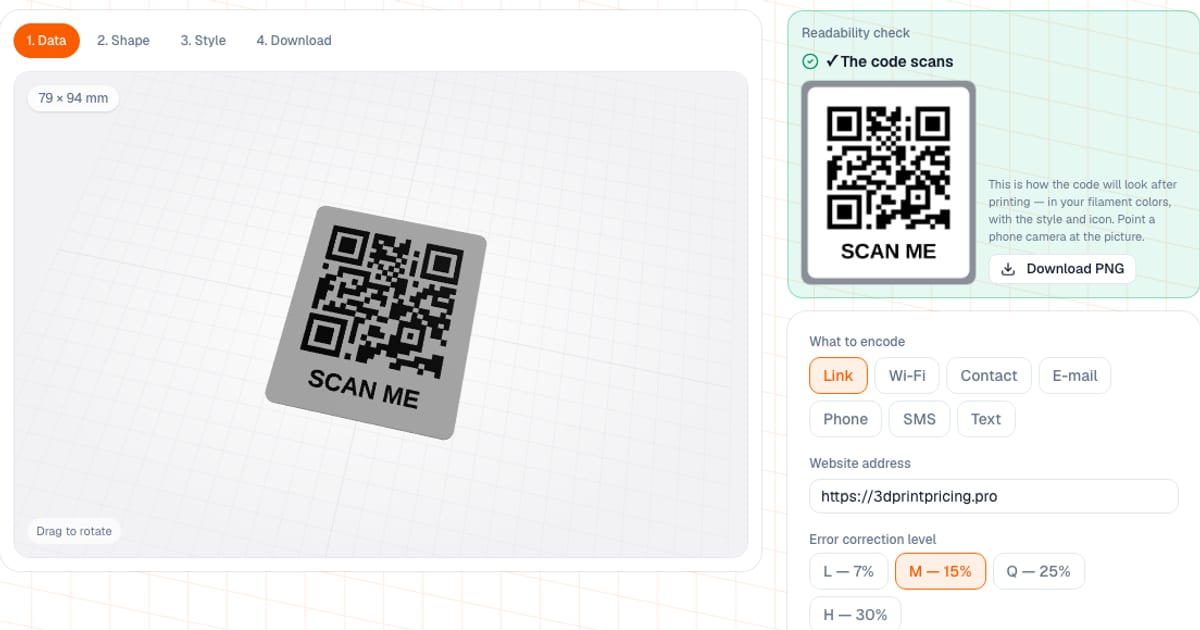
A QR plate generator turns a link, a Wi-Fi password, a contact or any text into a 3D model of a plate with a raised QR code, and gives you an STL or 3MF. The QR Plate Generator is free and runs in your browser: setup and preview need no sign-up, and downloading a file needs a free sign-in with an email address. Before you download, it checks that the code still reads.
Typical jobs for it: a Wi-Fi plate for guests, a menu on a cafe table, a link to reviews, a business card on a magnet. The model is built in your browser and the data you type never leaves it.
What can you encode in a QR plate?
| Template | What goes into the code |
|---|---|
| Link | a web address; if you leave out "https://" the tool adds it |
| Wi-Fi | WIFI:T:WPA;S:name;P:password;;, security WPA/WPA2/WPA3, WEP or none, hidden network |
| Contact | a vCard: name, phone, email, organization; the phone offers to save it, but it is many characters, so the code is dense |
| address, subject and message | |
| Phone | a number to call |
| SMS | a number and message text |
| Text | any free text |
Special characters in the Wi-Fi name and password are escaped automatically. Non-Latin text such as Cyrillic is stored as UTF-8 and read by phone cameras. The Encoded in the code line shows exactly what ends up in the code.
Which QR plate shape should you choose?
The numbers below are for a link code of 25 x 25 modules with each shape's default settings: the flat plate, stand, tent, wall plate and magnet have the SCAN ME caption under the code switched on, the keychain and coaster have no caption. Mass is the tool's estimate (PLA, 15% infill).
| Shape | Code | Size | Thickness | Mass | What is special |
|---|---|---|---|---|---|
| Flat | 60 mm | 79 x 94 mm | 2 mm | about 22 g | optional hole for a ring or lanyard |
| Desk stand | 60 mm | 79 x 102 mm, with the base on the bed 88 x 139 mm | 2.4 mm | about 49 g | tilt 60-75 degrees, default 70; slotted base as a separate part |
| Tent | 50 mm | two plates 66 x 86 mm, on the bed 140 x 182 mm | 2.4 mm | about 71 g | code on both sides, default tilt 65 degrees |
| Wall | 70 mm | 92 x 112 mm | 3.5 mm | about 46 g | countersunk screws 3-5 mm, keyhole slot or tape recesses |
| Magnet | 45 mm | 59 x 70 mm | 3 mm | about 17 g | pockets for magnets from 6 x 2 to 20 x 3 mm on the back |
| Keychain | 30 mm | 40 x 40 mm plus a lug | 2.5 mm | about 6 g | lug hole 3-8 mm |
| Mug coaster | 55 mm | 93 mm diameter | 3 mm | about 25 g | rim around the edge, engraved code |
Details of the shapes:
- Stand. The base depth is chosen from the center of mass. With the default settings the plate tips over only when tilted 22 degrees back or 36 degrees forward. If the margin is under 20 degrees, the tool warns you.
- Tent. Two identical plates stand in a shared base with two facing slots and their top edges meet.
- Wall. The keyhole slot fits a 3.5-4 mm screw head: hang the plate on the screw and slide it down. The tape recesses are shallow (0.6 mm) and sized for 12 mm wide foam double-sided tape.
- Magnet. The pockets are open towards the bed and you glue the magnets in with a drop of superglue. A pocket is 0.3 mm wider than the magnet; the default magnet is 10 x 2 mm and the count is picked automatically.
How big should the QR code be to scan reliably?
Three things decide whether a QR code reads: module size, the border around the code and contrast.
- Module. At least 0.8 mm (two passes of a 0.4 mm nozzle). The minimum code size is the number of modules times 0.8 mm, rounded up. You can set the code size from 20 to 200 mm.
- Quiet zone. The standard border is at least 4 modules. The tool has an auto mode on by default: the border equals 4 modules.
- Error correction. L is 7%, M is 15% (default), Q is 25%, H is 30%. The higher the level, the more and smaller the modules at the same size.
| What you encode | Modules (M) | Minimum for M | Modules (H) | Minimum for H |
|---|---|---|---|---|
Phone tel:+79001234567 | 25 | 20 mm | 29 | 24 mm |
| 26-character link | 25 | 20 mm | 33 | 27 mm |
Wi-Fi WIFI:T:WPA;S:HomeNet;P:password123;; | 29 | 24 mm | 37 | 30 mm |
| 54-character link | 33 | 27 mm | 41 | 33 mm |
| 82-character link | 37 | 30 mm | 49 | 40 mm |
Level H is needed when there is an icon or logo in the middle: with one, the tool always switches to H. The practical takeaway: a short link gives large modules. If your link is long, shorten it with a redirect of your own.
How do you put an icon or logo in the middle of the code?
Ready icons: Wi-Fi, Instagram, Telegram, WhatsApp, VK, YouTube, review, menu, phone, mail, website. Or upload your own PNG or SVG (up to 5 MB): it becomes a black and white silhouette by a brightness threshold. Halftones, gradients and lines thinner than 0.5 mm disappear in print, and the readability check shows it.
Modules under the icon are removed, so the icon size is capped: 12 to 40% of the code side (default 26%), no more than 20% of the area and no more than 60% of the error-correction reserve, the rest is left for printing flaws. Example: a Wi-Fi code of 37 modules with the Wi-Fi icon takes 9 x 9 modules under the icon, about 6% of the code area.
How do you make a Wi-Fi QR plate?
- On the Data step choose the Wi-Fi template and enter the network name, password and security type.
- Turn on Show network name and password as text: Network: and Password: lines appear above or below the code, with a Wi-Fi icon beside them. Letter height is 3-12 mm, default 5 mm; you can leave the password off.
- Long values are first shrunk, but not below 3.5 mm, then wrapped, and you get a warning.
- Put the Wi-Fi icon in the center and check readability.
The password is stored in the code itself, so anyone who scans the plate can read it. That is fine for a guest network; think twice for your main one.
How does the readability check work?
The generator draws the top view of the plate in your filament colors, with the style and icon, and reads it with the same type of decoder a phone camera uses. The result is Code reads fine, or reasons. They include: a module too small for the nozzle, weak filament contrast (below 3:1 is a risk, below 2:1 a camera cannot tell the modules from the background), an icon that ate the correction reserve, a negative, a narrow quiet zone. Beside it there is a picture you can test with a phone straight from the screen, and a Download PNG button.
Styling options include module styles (squares, rounded, dots, connected), corner eye styles (square, rounded, circle) and a raised or engraved code. Any combination goes through the check, and if a style gets in the way the tool warns you.
How do you print a QR plate?
- Position. The plate prints code up and needs no supports: the stand and tent base is a separate part, the slot walls lean no more than 30 degrees from vertical, and the magnet pockets and keyhole are open to the bed.
- Layers. 0.2 mm is enough, the relief has no overhangs. The default relief height is 1.2 mm.
- Two colors. A relief and base in different filaments read most reliably. The default is a white base with a black code. For a printer without an AMS the tool shows the filament change height (for a raised code it is the base thickness). With an AMS use the 3MF 2 colors file.
- One color. The relief reads by shadow and needs light from the side or above. That is weaker, so check with a camera before printing.
- Engraved code. The pocket floor prints in the first filament and the top of the plate in the second. The surface is flat, good for a coaster; without an AMS one filament change is enough.
- Filament. A contrasting pair such as black and white. Glossy filaments cause glare; matte ones read better.
Common mistakes
- Module too small. A 20 mm code for a long link gives modules under 0.8 mm. Enlarge the code or shorten the data.
- Not enough border. A border under 4 modules makes it hard for a scanner to find the code. Keep auto on.
- Weak contrast. Yellow on white or gray on black will not scan. Use a dark and a light filament.
- Negative. Light modules on a dark base are read by phone cameras but not by every scanner. If you can, swap the colors. Inversion also raises the quiet-zone frame, which is why a negative reads in two colors.
- Oversized icon. It eats the correction reserve. The tool caps the size, but do not push it to the limit.
- A static code. If the link changes you must reprint the plate. Encode an address you control, such as your own short redirect.
How is this different from regular QR generators and CAD?
- Regular QR generators give a PNG or SVG for paper and stickers. For 3D you would have to extrude that image in Tinkercad, Blender or Fusion and keep track of module size and border yourself.
- CAD and OpenSCAD give full control over the shape but have no readability check before you print.
- Paid dynamic QR services with analytics are useful if you want scan statistics: you can encode their link here as an ordinary address.
- Laser engraving suits metal and wood; for plastic on a printer this tool is handier.
For plates with text see the nameplate generator, and for keys the keychain generator. A similar approach to a name tag is described in the article on a pet address tag.
Frequently asked questions
- How do I make a 3D printable QR code online for free?
- Open the QR plate generator, choose what to encode (a link, Wi-Fi, contact, email, phone, SMS or text), pick a plate shape and download the STL or 3MF. Setup and preview are free with no sign-up; downloading the file needs a free sign-in with an email address.
- How big should a 3D printed QR code be?
- A module, one square of the code, should be at least 0.8 mm: two passes of a 0.4 mm nozzle. The minimum code size is the number of modules times 0.8 mm: 20 mm for a 26-character link, 30 mm for a long 82-character link.
- How do I make a QR code plate for Wi-Fi?
- Choose the Wi-Fi template and enter the network name, password and security type. You can print Network and Password lines in large letters above or below the code, the password optionally. Remember that the password is stored in the code itself, so anyone who scans the plate can read it.
- Can I put a logo or an icon in the middle of the QR code?
- Yes: ready icons (Wi-Fi, Instagram, Telegram, WhatsApp, VK, YouTube, review, menu, phone, mail, website) or your own PNG or SVG, which becomes a black and white silhouette. Modules under the icon are removed, error correction becomes H, and the icon size is capped by the error-correction reserve.
- What shapes of QR plate can I print?
- Seven: flat, desk stand, tent with a code on both sides, wall plate, magnet, keychain and mug coaster. Each has its own default sizes and mounting, and none needs supports.
- How can I check that the printed QR code will scan?
- The generator draws the top view of the plate in your filament colors, with the style and icon, and reads it with the same type of decoder a phone camera uses. It shows Code reads fine or the reasons: small module, low contrast, oversized icon, negative, narrow border.
- How do I print a QR plate in two colors?
- Download the 3MF 2 colors file: the base and the code are different filaments. With an AMS it prints as is; without one, add a filament change in the slicer at the height the tool shows (for a raised code, the base thickness). Keep the filament contrast at 3:1 or more, for example a black code on a white base.