
August 7, 2026
Stringing and Warping: the two most common FDM print defects, and what they actually cost
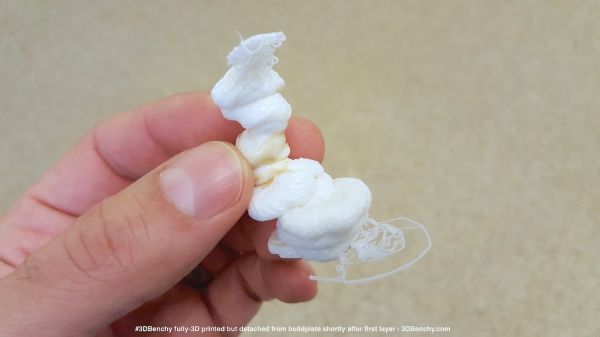
Stringing and warping are the two most common defects in FDM printing, and neither usually kills an order outright: the part comes off the bed looking mostly fine, but needs extra cleanup or, sometimes, goes straight in the bin. Both are fixable with settings — but it's just as important to price in the defect rate that remains even after the printer is dialed in.
Stringing: thin threads of plastic
Stringing is the fine webs of plastic that stretch between separate parts of a model wherever the nozzle traveled through open air. The cause is simple: while the nozzle moves from one printing point to another, a little molten plastic keeps oozing out from momentum — and it cools into a thin thread mid-air.
Main causes:
- Printing temperature too high — the plastic gets runnier and oozes more during travel moves.
- Insufficient retraction — the nozzle doesn't pull the filament back far enough (or at all) before traveling, and residual pressure in the melt pushes out a string.
- Wet filament — especially noticeable on PETG and nylon: moisture trapped in the filament flashes to steam inside the hot end and pushes plastic out.
Quick fixes:
- Drop the printing temperature by 5-10 °C from the current setting — often enough on its own.
- Increase retraction distance: direct-drive setups usually need 0.5-2 mm, Bowden setups 3-7 mm, but the exact value is tuned by trial and error per printer.
- Increase travel speed — the nozzle spends less time over the gap where it could ooze.
- Dry the filament before printing — if stringing shows up suddenly on a spool that used to print clean, check moisture first.
Warping: lifting and deformation
Warping is when a part — usually at the corners or edges — lifts off the bed or bows during the print. The cause is uneven cooling: the bottom layers cool and shrink faster than the top ones, pulling the part out of shape, and if bed adhesion is weaker than that stress, a corner lifts.
Warping shows up most on ABS and ASA — they shrink more on cooling than PLA does. PETG warps less often, but it can still happen, especially on large flat parts.
Main causes:
- Drafts and temperature swings in the room — sudden, localized cooling of one part of the print relative to the rest.
- Weak bed adhesion — a dirty bed, the wrong bed temperature, or no adhesion aid suited to the material.
- Too much cooling fan on the first layers of materials that shouldn't be cooled aggressively, like ABS and ASA.
Quick fixes:
- An enclosed chamber — the most reliable fix for ABS/ASA: a stable temperature around the part sharply reduces the gap between layers.
- The correct bed temperature for the material, and a clean bed before every print.
- Adhesion aids: glue stick, specialty spray, a PEI sheet — what works best is usually found by testing against your specific plastic and bed.
- A skirt or brim around the part — increases edge contact area and acts as a thermal buffer.
- Turning the cooling fan down or off for the first layers of ABS/ASA — this recommendation is specific to those materials and doesn't apply to PLA, which usually needs strong cooling instead.
How to price in a realistic defect rate
Even with the printer dialed in, some orders will still fail — filament runs out mid-print, a corner lifts, a part comes unstuck. The sensible approach isn't chasing zero defects at any cost, it's pricing in a realistic failure rate.
The logic is simple: if your order history shows a failure rate of X%, the price of a successful print needs to be raised enough to cover the material and time spent on the failed attempts too.
Price with defect margin = print cost ÷ (1 − defect rate)
Example. Print cost is $6, and recent order history shows a 5% failure rate for this type of job:
6 ÷ (1 − 0.05) = 6 ÷ 0.95 ≈ $6.32
That $0.32 difference looks small on a single order, but it's what keeps a print farm from slowly bleeding margin on order types where a reprint is statistically inevitable, not a one-off mistake. Track defect rate separately by order type — small parts with lots of overhangs fail far more often than plain rectangular enclosures — and use the actual figure for that job type rather than a shop-wide average.
Calculate your price in a minute
Free calculator: part weight, print time, material price — no sign-up needed.
 App Store
 Google Play
 RuStore
Regular printer maintenance — a clean nozzle, a calibrated bed, up-to-date print profiles — cuts the defect rate more than any single settings tweak. If you haven't checked your maintenance schedule in a while, see the FDM printer maintenance schedule.
Bottom line
Stringing is fixed with temperature, retraction and travel speed. Warping is fixed with bed adhesion and a stable temperature around the part. No printer stays at zero defects forever, so a realistic failure rate belongs explicitly in your pricing — not quietly absorbed as a loss on every tenth or twentieth print.