
October 7, 2026
GLB to STL Converter Online: Make AI 3D Models Printable
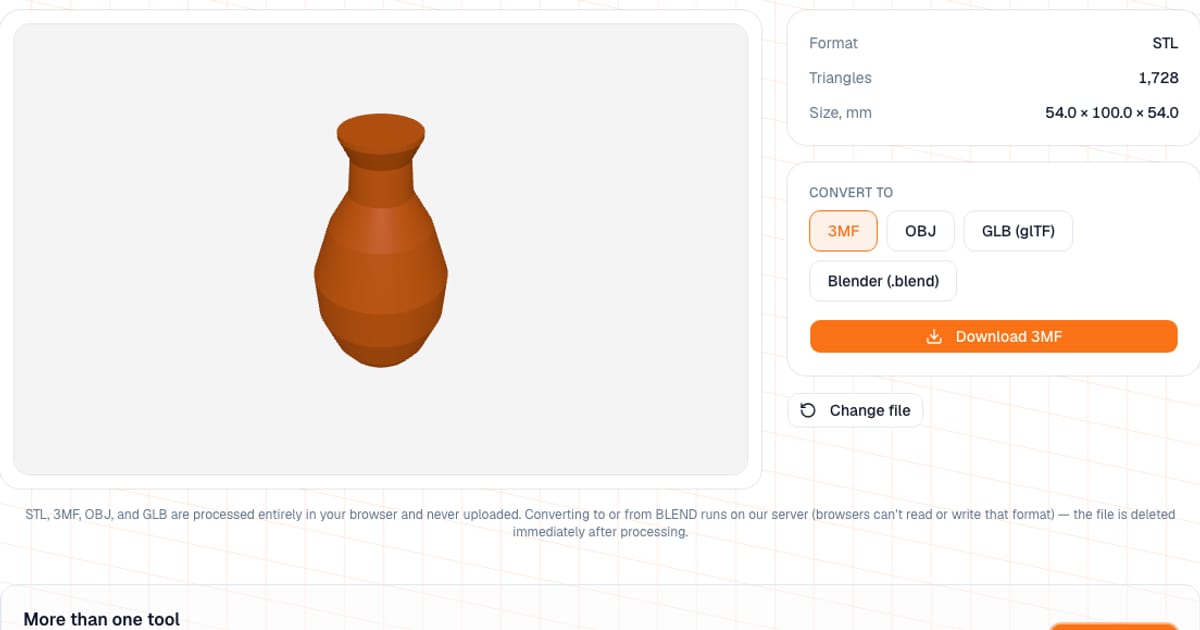
To convert a 3D model, drop the file into the free online 3D model converter, pick the output format and download it. It converts between STL, 3MF, OBJ, GLB and BLEND while keeping the shape and size. STL, 3MF, OBJ and GLB are converted entirely in your browser and never uploaded. You can convert and preview right away; to download the result you need a free sign-in (sign-up with an email address).
I built it mainly for one common job: turning a GLB from an AI generator (Meshy, Tripo) or Sketchfab into an STL a slicer can open. But any of the five formats can be the input or the output.
How do I convert GLB to STL (or any other pair)?
- Open the converter.
- Drop a file or click the box. Supported inputs are
.stl,.3mf,.obj,.glband.blend. - Check the preview and the info: source format, triangle count, size in mm.
- Under "Convert to", pick the target format. The file's own format is not offered.
- Click Download. If you are not signed in, a sign-in or sign-up window opens; after that the download continues by itself.
Which formats are supported, and where are they processed?
| Format | Read | Write | File limit | Processed |
|---|---|---|---|---|
| STL | yes | yes (binary) | 80 MB | in your browser |
| 3MF | yes | yes (units: mm) | 80 MB | in your browser |
| OBJ | yes | yes | 80 MB | in your browser |
| GLB | yes (including Draco and Meshopt) | yes | 80 MB | in your browser |
| BLEND | yes | yes | 30 MB | on the server, file deleted right after |
BLEND runs on the server for a simple reason: it is a closed binary format holding an entire Blender scene, and there is nothing to read or write it with in a browser. Server conversion has a time limit (up to a minute) and handles one file at a time, so you may occasionally see "server busy, try again in a minute". The whole scene is exported, not just the selected objects, so delete stray meshes from the .blend first.
What is kept and what is lost?
The converter works on geometry only. That is an honest limit, not a bug: STL stores nothing but triangles.
| What | Kept? |
|---|---|
| Shape, dimensions, triangle count | Yes |
| Scale | STL and OBJ are read as millimeters with no rescaling; GLB is converted from meters |
| Colors, materials, textures | No |
| Animations (GLB) | No |
| Several objects in one file | Merged into a single mesh |
| Repairing holes and mesh errors | No, the converter does not fix anything |
The last row matters: if a model was broken in the source format, it stays broken in the new one. What those problems look like and how to find them is covered in Is My STL File Broken?, and you can check and repair a mesh with STL Repair.
Which format should I pick for 3D printing?
- STL is the most compatible option for one single-color part. It opens everywhere.
- 3MF is the default in Bambu Studio, PrusaSlicer and OrcaSlicer, and it stores units. Note that this converter does not carry colors over, so set up multicolor in the slicer.
- OBJ is mostly for moving a model between editors such as Blender; you rarely need it for slicing.
- GLB is a format for the web, AR and games. Slicers do not open it directly, so for printing you convert it to STL or 3MF.
GLB to STL: what happens to the scale?
glTF and GLB use meters with Y pointing up. Printing is the opposite: millimeters with Z up. So when a GLB is loaded, the converter multiplies the coordinates by 1000 and rotates the model 90 degrees around the X axis, which puts it on the bed the right way up. Writing a GLB applies the reverse transform, so the file opens at its real size in viewers.
Not every GLB is drawn at real-world scale, though. AI-generated models and game assets are often built in arbitrary units. After loading, look at the dimensions in the info panel, and if they look wrong, rescale in your slicer.
How do I print a model after converting it?
| What to check | Recommendation |
|---|---|
| Dimensions | Compare with the build volume; scale or split the model if it does not fit |
| Orientation | Put the largest flat face on the bed and rotate the part to reduce overhangs (the overhang checker helps) |
| Thin features | A wall under 0.8 mm with a 0.4 mm nozzle (two perimeters) may not print |
| Layer height | 0.2 mm for ordinary parts, 0.12 to 0.16 mm for fine detail |
| Mesh integrity | Run GLB files from AI generators through a mesh check: holes and self-intersections are not unusual there |
Common mistakes
- Converting to OBJ to keep color. The converter carries color over into no format. Paint or assign colors in the slicer.
- Expecting a multi-part 3MF to stay multi-part. After converting to STL, all parts are merged into one mesh.
- Forgetting the limits. Above 80 MB the browser refuses the file; above 30 MB the server-side BLEND conversion refuses it. Reduce the detail.
- Expecting STEP or FBX. The converter does not read them: export to one of the five formats first.
When should I use something else?
For a one-off "GLB to STL" or "3MF to STL", this converter is convenient because there is nothing to install and the model does not go to someone else's server. If you need to keep color and materials, or work with dozens of formats (STEP, FBX, PLY), use Blender (imports and exports most formats, and lets you edit the mesh) or MeshLab. Cloud converters such as Convertio support more formats, but your file is uploaded to their servers. And for ordinary print prep, the slicer itself is often enough: PrusaSlicer, Bambu Studio, OrcaSlicer and Cura open STL, 3MF and OBJ directly, so no conversion is needed.
What next?
Converted the model and want to confirm it is fine? Open it in the viewer and check the dimensions. Ready to print? Work out the cost in the calculator, or read how to calculate 3D printing cost.
Frequently asked questions
- How do I convert GLB to STL for 3D printing?
- Drop the .glb file into the converter and choose STL or 3MF. The model is rescaled from meters to millimeters and rotated so it stands correctly, while textures and materials are dropped. Conversion runs in your browser; downloading the result needs a free sign-in.
- How do I convert 3MF to STL?
- Drop the 3MF into the converter, pick STL and download. Shape and size are preserved, but colors, materials and the split into separate objects are lost: all parts are merged into a single mesh.
- What is the difference between STL, 3MF, OBJ and GLB?
- STL stores only triangles, with no color or units. 3MF is a ZIP with XML holding geometry, units (mm), color and multiple objects. OBJ stores geometry with optional normals and UVs, with materials in a separate .mtl. GLB is binary glTF with textures for the web and games, and slicers do not open it directly.
- Which is better for 3D printing, STL or 3MF?
- STL is the most compatible choice for a single, single-color part. 3MF is better when units and scale matter, and multicolor projects are easiest to set up in the slicer itself.
- Can I convert a Blender .blend file to STL online?
- Yes, but a browser cannot read .blend files, so the file is processed on our server and deleted right after. The limit for BLEND is 30 MB and the whole scene is exported.
- Is my file uploaded when I convert it?
- STL, 3MF, OBJ and GLB (up to 80 MB) are converted in your browser and never uploaded. Only BLEND (up to 30 MB) goes to the server, because there is no other way to read it.
- Are colors and textures kept when converting?
- No. The converter carries over geometry only. Color, materials, textures and animations are dropped, because STL cannot store them.