
October 7, 2026
Overhang Checker for STL Online: Do You Need Supports?
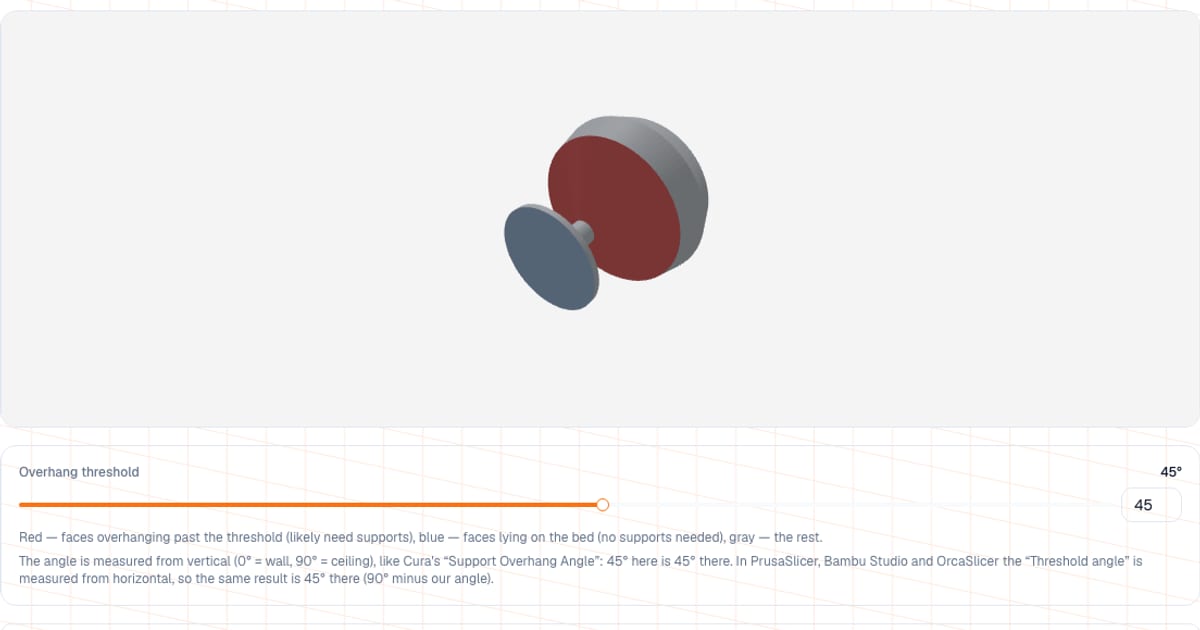
To find out whether a model needs supports, load an STL, 3MF, OBJ or GLB into the overhang checker. Faces that overhang more than your chosen angle (45 degrees from vertical by default) turn red, and a percentage beside the model shows how much of the surface is affected. It runs in your browser in seconds, with no slicer and no sign-up, and the file (up to 80 MB) is never uploaded.
The result is a quick estimate from face angles, not a verdict: the final call on supports belongs to the layer preview in your slicer. But for a first look, especially at a model you did not design yourself, it is enough.
What are supports in 3D printing, and when do you need them?
An FDM printer lays plastic down layer by layer, and each layer rests on the one below. If a wall leans only slightly off vertical, the new layer sits on most of the old one and holds. The more it leans, and the closer the surface gets to a horizontal "ceiling", the less there is underneath, until at some point the strand sags. For those spots the slicer prints supports: temporary structures you snap off afterwards.
A practical guide: up to 45 degrees from vertical, most printers with decent part cooling print without supports. Around 60 degrees the underside is visibly rough, and at 70 degrees or more you usually cannot avoid supports. These are typical values, not laws of physics: a lot depends on material, temperature, cooling and speed.
How do I check overhangs? Four steps
- Open the overhang checker and drop in your model (
STL,3MF,OBJorGLB, up to 80 MB). - Rotate it. Red marks faces overhanging more than the threshold, blue marks faces lying on the bed (no supports needed), and everything else is gray.
- Move the "Overhang threshold" slider (or type a number): the range is 5 to 80 degrees, 45 by default. The highlighting and the percentage update immediately.
- Read the "Overhanging surface share" row: the share of the model's total face area, in percent, to one decimal place. Faces lying on the bed are not counted here; their share is shown in a separate "Lying on the bed" row.
How do I read the angle? From vertical, not horizontal
The angle is measured from vertical: 0 degrees is a vertical wall (no overhang) and 90 degrees is a horizontal ceiling. Faces pointing up or straight sideways count as safe.
| Angle from vertical | What kind of surface | Usually |
|---|---|---|
| 0 | vertical wall | prints without trouble |
| up to 45 | wall with a slight lean | usually no supports |
| 45 to 60 | strong lean | rough underside, sometimes needs supports |
| 60 to 80 | almost a ceiling | supports or a different orientation |
| 90 | horizontal ceiling or bridge | supports, or a bridge if the span is short |
Be careful with slicer settings: they use different reference directions. In Cura the "Support Overhang Angle" is measured from vertical (0 supports everything, 90 supports nothing), the same as here, so the number carries over unchanged. In PrusaSlicer, Bambu Studio and OrcaSlicer the "Threshold angle" is measured from horizontal (in PrusaSlicer the tooltip says "90 degrees = vertical wall"), and supports are generated under faces whose slope from horizontal is below the threshold. So the value there equals 90 minus ours: our 30 degrees is 60 in PrusaSlicer, Bambu Studio or OrcaSlicer, and 45 is the same in both. Under the slider the tool shows the converted values for the threshold you picked.
What overhang threshold should I use?
For PLA and PETG, start at 45 degrees. For an important part with a clean surface, lower the threshold to 35-40 degrees: more doubtful spots light up, and you decide whether to rotate the model or add supports. If your printer has strong part cooling and the model is simple, you can raise it to 50-55 degrees and see what stays red.
What does the tool not consider?
- The bed. The bed is taken to be the lowest point of the model (in the position saved in the file). Bottom faces at that level are blue and not counted in the percentage. If a model floats above the bed in the file and its support is not modeled, the tool will not notice.
- Orientation. The model is analyzed in the position saved in the file (Z up). The tool does not rotate it. To test another orientation, rotate the model in your slicer or editor, save the STL and load it again.
- Bridges. A horizontal span between two supports also turns red, but short bridges (a few millimeters) often print without support when cooling is good. The tool does not estimate span length.
- Layers and settings. A slicer sees the model layer by layer and accounts for layer height, cooling and your settings. This tool only sees face angles.
How do I print a model with overhangs?
| Technique | How to do it |
|---|---|
| Rotate the model | Put the largest flat face on the bed, or turn the part so there is less red area |
| Replace a ledge with a chamfer | Use a 45 degree slope instead of a horizontal shelf; it prints without supports |
| Horizontal holes | Draw them as a teardrop or diamond instead of a circle, so the top of the hole is at 45 degrees |
| Tree supports | Tree and organic modes (in Cura, PrusaSlicer, Bambu Studio and OrcaSlicer) generally use less plastic and are easier to remove |
| Gap to the part | The Z gap between support and part (typically 0.15 to 0.2 mm): smaller and the support fuses, larger and the underside gets worse |
| Build plate only | If you can leave an overhang unsupported, enable "supports on build plate only" so you do not have to dig inside the model |
After removing supports, the surface is usually sanded and cleaned up, as described in FDM post-processing: sanding, painting and gluing. Supports cost money: plastic and print time. Once the model is sliced, load the G-code into the analyzer and compare usage with and without supports.
Common mistakes
- Treating red as an order. Red means "take a closer look", not "add supports everywhere". Check the layer preview.
- Not converting the slicer's angle. A 55 degree threshold in PrusaSlicer and 55 degrees in this tool are different things, see above.
- Ignoring cooling. The same model prints without supports on a printer with strong cooling and needs them on a weak one, and overheated plastic sags earlier.
- Ignoring a large red share above the base. If there is a lot of red, spend five minutes rotating the part; supports will cost more.
- Forgetting mesh quality. Overhangs are not the cause if the slicer complains about holes: then read about common STL mesh errors.
When should I use a slicer instead?
This tool is handy for a quick check, but make the final decision in your slicer:
- PrusaSlicer has a slider for highlighting overhangs by angle in its support painting tool, and you can add or block supports by hand in specific areas.
- Cura has a setting that highlights overhanging areas in red.
- Any slicer shows the layers and the supports themselves after slicing, which is the most accurate picture.
What this tool has going for it is that it opens instantly, needs nothing installed, works on any device, and does not send your file to a server.
What next?
Checked the overhangs and settled on an orientation? Open the model in the viewer to confirm its dimensions, then estimate the print price in the calculator. If your slicer complains about the file itself, start with STL Repair.
Frequently asked questions
- What are supports in 3D printing and why are they needed?
- Supports are temporary structures under the overhanging parts of a model. A printer cannot extrude in mid-air, so without them the layers would sag. They are removed after printing and the surface they touched is cleaned up.
- What overhang angle can a 3D printer print without supports?
- A common rule of thumb is 45 degrees from vertical: faces leaning less than that usually print fine on a printer with good part cooling. For critical parts people often drop the threshold to 35-40 degrees to flag more questionable spots.
- How can I check if my STL needs supports before slicing?
- Load the model into the overhang checker. Faces overhanging more than your chosen angle turn red, and a percentage shows the share of the surface affected. It is a quick angle-based estimate; confirm with the layer preview in your slicer.
- How does this tool calculate the overhang angle?
- For every triangle it measures the angle between its plane and vertical: 0 degrees for a vertical wall, 90 degrees for a horizontal ceiling. The threshold can be set from 5 to 80 degrees, with 45 as the default. This is the same convention as Cura's “Support Overhang Angle”; in PrusaSlicer, Bambu Studio and OrcaSlicer the threshold is measured from horizontal, so it equals 90 minus our angle.
- Does a red face always mean I need supports?
- No. It is an estimate from the angle. The real need also depends on the length of the overhang, cooling, speed and slicer settings, and short bridges often print without support.
- Why is the bottom of my model not red?
- The tool takes the lowest point of the model as the bed: faces that point down and sit at that level (within 0.1 mm) need no supports. They are shown in blue, are left out of the overhang share and get their own row, "Lying on the bed". Only surfaces above the base stay red.
- Is my file uploaded to a server?
- No, the calculation runs locally in your browser and the file (up to 80 MB) is never uploaded. No sign-up is required.