
October 7, 2026
Two-Word 3D Illusion: Free Text Flip Generator for 3D Printing
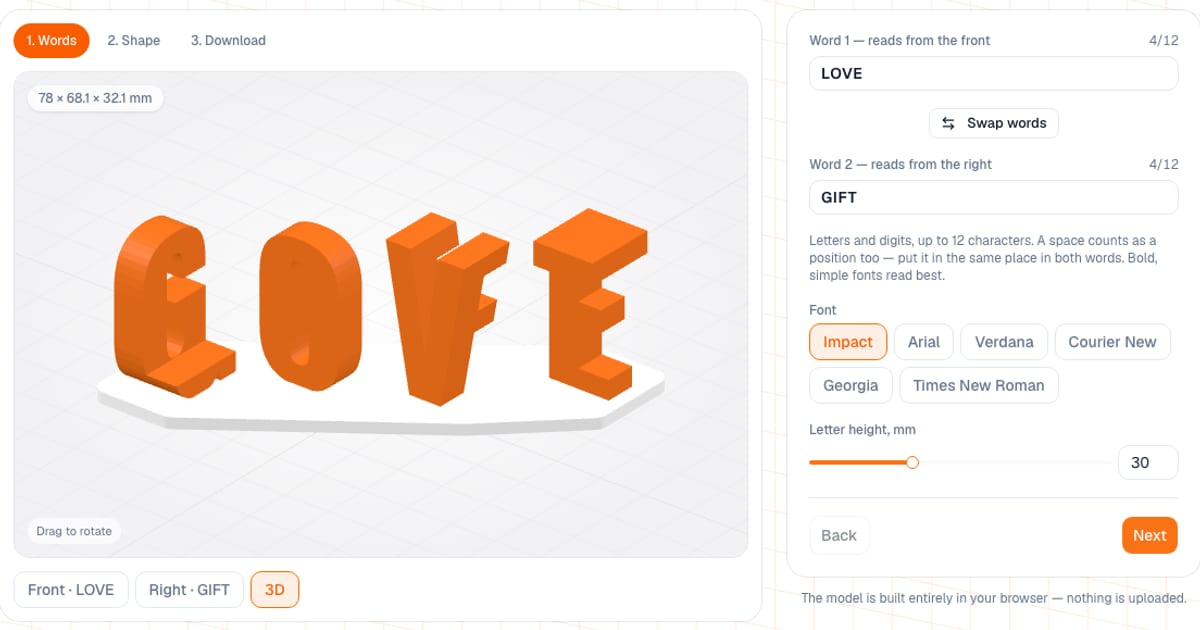
A text flip is a 3D sculpture that reads as one word from the front and as a different word from the right. The Text Flip generator builds it from two words of the same length and gives you an STL, a 3MF or a two-color 3MF. It is free and runs in your browser; downloading the file needs a free email sign-in. Your words are not sent anywhere: the model is built on your machine.
I made it for gifts: two names of the same length, LOVE and a name, 2026 and 2027. It is not an ambigram in the strict sense (one word that reads the same when rotated) but a "dual sculpture": two different words in one object.
How do I make a two-word illusion?
- Type word 1 (it reads from the front) and word 2 (it reads from the right). They need the same number of characters, 12 at most.
- Pick a font and a letter height.
- On the "Shape" step set the gap between letters and the base.
- Use the "Front" and "Right" buttons to check both views.
- Download STL, 3MF or "3MF · 2 colors".
Letters are converted to capitals. Latin and Cyrillic letters and digits are supported, and a space counts as a position too.
What can I adjust?
| Setting | Default | Range |
|---|---|---|
| Words | LOVE and GIFT | same length, up to 12 characters |
| Font | Impact | Impact, Arial, Verdana, Courier New, Georgia, Times New Roman |
| Letter height | 30 mm | 15–60 mm |
| Gap between letters | 3 mm | 1–10 mm |
| Base | thin, 2.4 mm | thin 2.4 mm, thick 4 mm, custom 1.2–15 mm, no base |
| Base shape | diagonal strip | strip or rectangular plate |
| Base margin around the letters | strip 3 mm, plate 5 mm | 1–30 mm, separately left-right and front-back |
| Base corner radius | equal to the shape's margin | 0 up to the smaller margin |
The font names in the list are the familiar ones, but the actual font files are different: Impact is drawn with Oswald Bold, Arial with Arimo, Verdana with PT Sans, Georgia with PT Serif, Times New Roman with Tinos and Courier New with Cousine. These are open fonts with verified Cyrillic coverage, so the look can differ from the Windows font you know.
What do I get as output?
- STL: one closed solid, base and letters together.
- 3MF: the same object as a single-color 3MF.
- "3MF · 2 colors": two parts, base and letters, with filaments already assigned (when there is a base).
The Download step shows the model's dimensions, the triangle count and the weight in grams (volume × 1.24 g/cm³, the density of PLA), with a separate line for the base. Size comes from three things: the letter height, the letter widths in the chosen font and the gap between blocks. The more letters and the taller they are, the wider the model: long words at 40–60 mm height easily overflow a print bed.
How do I pick words, and what about spaces and dots?
- Same length. If the words differ in length the generator shows how many characters each has. Add or remove letters.
- Spaces in the same places. If a space is in only one word, the letter paired with it vanishes. A space at the same position in both words is fine: it leaves a gap of about a third of the letter height.
- Dots and accents. On letters like Ä, É or Й the accents are not attached to the letter and would float in the air in the intersection. The generator removes them and tells you which letters were affected. In Verdana and Georgia the tail of Q is a separate stroke too, so pick Impact or Arial for Q.
- Pair ideas. MOM and DAD, LOVE and HOPE, two names of equal length, LOVE and a name, 2026 and 2027.
Where do I look from?
The first word is visible straight from the front, the second straight from the right, roughly at letter level. On a shelf, turn the sculpture corner-first toward the viewer: as you walk past, one word turns into the other. Each block (a letter pair) is shifted diagonally by one letter width, so the blocks never hide each other from either side.
How do I print a text flip?
- Print it as downloaded, base down. No need to lay it on its side.
- Layers of 0.12–0.16 mm for letters 20–30 mm tall; from 40 mm up, 0.2 mm is enough.
- Supports are usually not needed. If letters have wide horizontal bars (T, F, 7) and your printer struggles with overhangs longer than 5 mm, enable tree supports.
- 3–4 walls and 15–20% infill: the letters are slim, and the walls give them strength.
- For two colors, download "3MF · 2 colors": base on filament 1, letters on filament 2. The file is made for Bambu Studio and OrcaSlicer. Without an AMS, print the regular file and add a filament change at the top of the base, shown under the button (2.4 mm with the thin base).
The base and letters form one closed body with no holes or self-intersections, so there is nothing to repair before slicing.
Can I print it without a base?
You can choose "No base", and every letter pair then stands on the bed as a separate piece. The generator works out the contact patch and the center of mass of each pair and warns if a pair may tip over: a contact patch under 15 mm² or a tipping angle under 5° (most often V, J and Q with a narrow or round bottom). It is more reliable to keep a base, or enable a brim in the slicer and use bed glue.
Common mistakes
- Words of different lengths, or a space in the wrong place.
- A thin serif font. The intersection pillars come out thin and the letters read worse.
- A long word at a large height. If the model is wider than 220 mm the generator warns you: reduce the letter height, the gap or the base margins.
- Printing without a base despite the warning. Pairs with V, J or Q can tip over while printing or at a light nudge.
- Looking from another angle. The first word reads straight from the front and the second straight from the right; in between, the words are not readable.
How does it compare with other options?
Parametric "text flip" models are available on sites such as MakerWorld, Printables and Thingiverse. You can also build one by hand in OpenSCAD, Blender or Fusion: two extruded texts and a boolean intersection.
- When ours is more convenient: you want two words without CAD, a stability check, a configurable base, Cyrillic support and a ready two-color 3MF for Bambu Studio and OrcaSlicer.
- When something else is better: you need your own font file, a logo instead of a letter, an angle other than 90°, or three words on three sides. That is manual modeling territory.
For a plain text gift, see the keychain tag generator and the nameplate generator, and for a photo gift try a lithophane from a photo.
Frequently asked questions
- How do I make a two-word 3D illusion for 3D printing?
- Open the Text Flip generator, type two words with the same number of characters (up to 12), pick a font and letter height, check both views and download an STL or 3MF. Setup is free; downloading needs a free email sign-in.
- How does a text flip illusion work, with one word from the front and another from the side?
- For every position the tool takes two letters: the letter of the first word is extruded front to back and the letter of the second word side to side, and only their common part remains. From the front it looks like the first letter, from the right like the second. The blocks are staggered diagonally by the letter width so they never hide each other.
- Why do both words need the same length?
- Each block is a pair of letters. If the second word is a letter short, there is nothing to intersect with and the letter of the first word vanishes. Add or remove a letter, and put spaces in the same positions in both words.
- Does a text flip print need supports?
- Usually not: the blocks stand on the base and the walls follow the letter outlines. Overhangs appear only under horizontal strokes such as the top of a T or the bars of an F, and they are usually short. If your printer struggles with overhangs longer than 5 mm, enable tree supports.
- Which font works best for a text flip?
- A bold, simple one: Impact or Arial. Thick strokes make thick, sturdy intersection pillars and a crisper silhouette. Serif fonts work too, but the serifs come out thin.
- Can I print a text flip in two colors?
- Yes. The 3MF with 2 colors button exports a Bambu Studio and OrcaSlicer project with the base on filament 1 and the letters on filament 2. Without an AMS, print the regular file and add a filament change at the top of the base; the height is shown under the button.
- Where do I look from to read both words?
- The first word reads straight from the front and the second straight from the right, roughly at letter level. The Front and Right buttons under the preview show both views. On a shelf, turn the sculpture corner-first toward the viewer: as you walk past, one word turns into the other.