
October 7, 2026
3D Printed Keychain Generator: Free Online Name Tag Maker
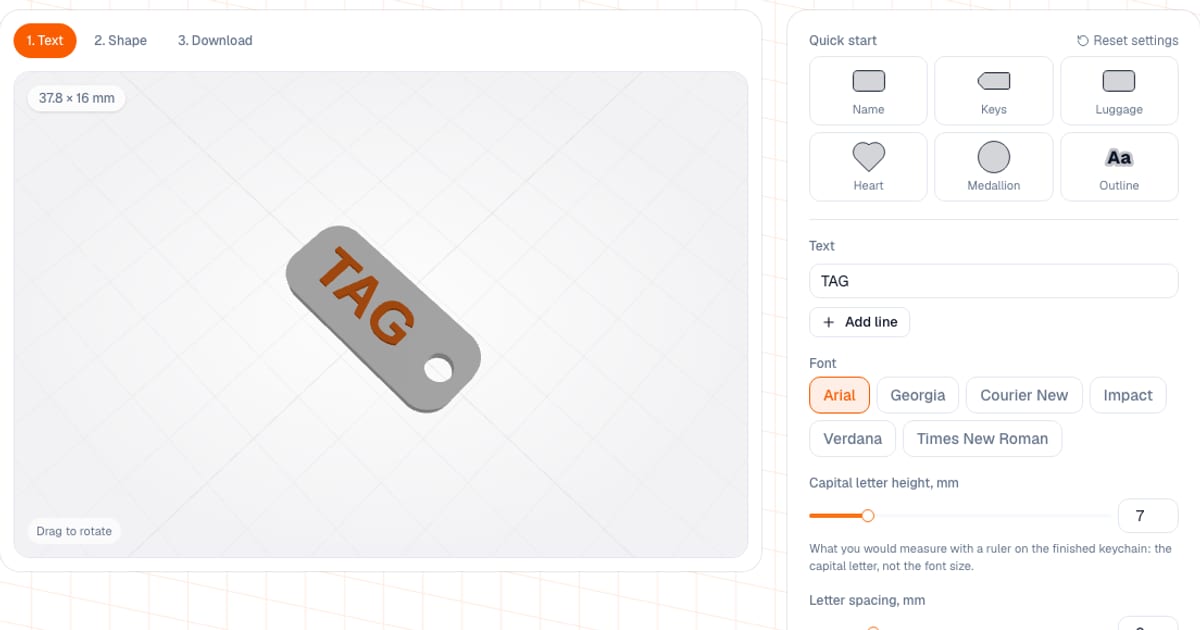
You can make a custom keychain for a 3D printer in a couple of minutes: type your text (up to 3 lines), choose a shape and an attachment, then download an STL or 3MF. The keychain generator is free, runs in your browser and fits the tag size to your text by itself. Setup and preview need no sign-up; to download the file you need a free email sign-in.
I built it so a name on a key ring doesn't need CAD. The letters are real vector font outlines, not a stair-stepped bitmap, and the size is driven by the text itself: you set the height of the capital letters in millimeters, as a ruler would measure it on the finished keychain.
How do I make a name keychain on a 3D printer?
- Open the generator. Start from a ready preset (Name, Keys, Luggage, Heart, Medallion, Outline) or build from scratch.
- "Text" step: up to 3 lines of 20 characters, font, capital letter height, alignment.
- "Shape" step: the tag shape, margin around the text, corner radius, base thickness, raised or engraved text, attachment.
- "Download" step: STL, 3MF or "3MF · 2 colors", dimensions, weight.
Your settings are remembered in the browser, so you can come back to the same keychain.
What can I adjust?
| Setting | Default | Range |
|---|---|---|
| Text | TAG | 1–3 lines, up to 20 characters per line |
| Font | Arial | Arial, Georgia, Courier New, Impact, Verdana, Times New Roman |
| Capital letter height | 7 mm | 3–25 mm |
| Lines 2 and 3 | 70% of the first | 40–100% |
| Margin around the text | 4 mm | 2–12 mm |
| Corner radius | 5 mm | 0–15 mm |
| Base thickness | 3 mm | 1.5–6 mm |
| Relief height | 1 mm | 0.4–3 mm |
| Engraving depth | 0.8 mm | 0.4–2 mm |
| Hole diameter | 5 mm | 2–10 mm |
| Hole center inset from the edge | 5 mm | 3–15 mm |
Also available: letter spacing from −1 to 4 mm and line spacing of 0–8 mm. The fonts are always bold: a regular-weight stroke on 4–5 mm letters comes out around 0.4–0.5 mm, right at the nozzle width.
Shapes (14 plus one): rectangle, circle, oval, label, heart, star, hexagon, octagon, shield, cloud, drop, flower, house, fish. A separate "Text outline" shape makes a base that follows the letters with a 1.5–6 mm offset, and it always uses a side loop.
Attachment: a hole inside the shape (top, left, right, top left or top right), an outside loop that moves the hole beyond the outline so it takes no room from the text, or no hole at all.
The shape grows with the text up to 200 mm; beyond that the text itself shrinks (the generator tells you how many millimeters the capitals ended up). If the keychain comes out larger than 120 mm you get a warning.
What presets are there?
| Preset | Shape | Attachment | Text |
|---|---|---|---|
| Name | rectangle | hole on the right, 5 mm | raised, capitals 8 mm |
| Keys | label | hole on the left | engraved 0.8 mm, capitals 7 mm |
| Luggage | rectangle | hole on the left, 6 mm | raised, capitals 8 mm, second line at 60% (a sample phone number is filled in if the line is empty) |
| Heart | heart | loop on top, 4 mm | raised, capitals 6 mm |
| Medallion | circle | loop on top, 4 mm | engraved 0.8 mm, capitals 7 mm |
| Outline | text outline | loop on the left, 5 mm | raised, capitals 10 mm, base 2.4 mm |
A preset changes the shape, attachment, sizes and mode, and your text stays.
Raised or engraved text, and how to make two colors
- Raised. The letters stand 0.4–3 mm above the base (1 mm by default) and are welded into it with an overlap.
- Engraved. The letters become windows in the top layer, 0.4–2 mm deep; a solid floor of at least 0.8 mm remains under the engraving.
- Two colors. The "3MF · 2 colors" button exports a project for Bambu Studio and OrcaSlicer: base on filament 1, text on filament 2. With engraving, the second color is the top layer of the keychain with the letter windows, and the letters show the base color. Without an AMS, print the regular file and add a filament change at the height shown under the button. PrusaSlicer and Cura don't read this project: use the STL or the plain 3MF.
How do I print a keychain?
- 0.16–0.2 mm layers; no supports are needed because the relief has no overhangs.
- Thread the ring on after printing.
- Use 3–4 perimeters around the hole and a base at least 2 mm thick so the keychain doesn't tear.
- The minimums the generator warns about: capitals of at least 3 mm, relief or engraving of at least 0.4 mm. The hole is kept at least 2 mm of bridge from the edge, and away from the letters by at least the text margin.
- Material: PLA for a souvenir, PETG for keys in a pocket, TPU for a flexible keychain (it prints more slowly).
The "≈ filament, g" line on the Download step shows the weight. If you print keychains to sell, the "Estimate the cost" button opens the calculator with that weight, and the pricing logic is covered in How to Calculate 3D Printing Cost. As a rough example, a 4 g keychain from a $20/kg spool uses about $0.08 of PLA.
Common mistakes
- Text that is too small. Capitals under 3 mm run together. Shorten the text or make the keychain larger.
- A hole at the very edge or next to the letters. The tool moves the hole center at least the radius plus 2 mm from the edge, but a base that is too thin still tears.
- Ring inserted before printing. You can't print it that way; the hole must be empty.
- A thin serif font on small text. Prefer bold sans fonts such as Arial or Impact.
- Expecting a logo or icon. The generator has only text and shapes.
- A keychain instead of a pet tag. For pets there is a separate pet ID tag: the animal shapes were removed from the keychain.
How does it compare with other keychain generators?
Keychains with images and logos are made by services that accept SVG uploads, such as StencilCut (two-color 3MF and a key ring) and "Image to Keychain" in Bambu's MakerLab. Simple text tags can also be built by hand in Tinkercad or OpenSCAD.
- When ours is more convenient: you want a name or short text tag, 15 shapes, presets, Cyrillic support, raised or engraved letters and a two-color 3MF. The shape fits the text by itself.
- When something else is better: the keychain needs a logo, a photo or an icon, or a custom shape outside the list.
If you want a QR code instead of text, see the QR plate generator: it has a keychain form with a loop. You can also make a map keychain: the terrain relief generator has a "keychain" item with a 5.8 mm hole.
Frequently asked questions
- How do I make a custom name keychain for a 3D printer?
- Open the keychain generator, type a name (up to 3 lines of 20 characters), choose a shape, font and attachment, check the preview and download an STL or 3MF. The tag size fits the text automatically. Setup is free; downloading needs a free email sign-in.
- What filament is best for a 3D printed keychain?
- PLA is fine for a souvenir. For keys that rattle around in a pocket, PETG is more reliable because it is less brittle. TPU makes a flexible keychain but prints more slowly. Use 0.16 to 0.2 mm layers; no supports are needed.
- When should I thread the key ring on?
- After printing. You cannot print the keychain with the ring already inserted, because the hole is left empty. For strength, use 3 to 4 perimeters around the hole and a base at least 2 mm thick.
- What hole diameter should I choose for the key ring?
- The default is 5 mm, with a range of 2 to 10 mm. For a thick ring or a carabiner, make the hole bigger. The tool keeps the hole center at least the radius plus 2 mm from the edge so the bridge does not snap.
- How tall should the letters on a keychain be?
- The default is 7 mm measured on the capital letter, with a range of 3 to 25 mm. Letters under 3 mm print poorly, and raised or engraved text thinner than 0.4 mm is only one or two layers. The generator warns about both.
- Can I print a two-color keychain without an AMS?
- Yes. Download the regular file and add a filament change in the slicer at the height shown under the 3MF with 2 colors button. With an AMS, open that 3MF in Bambu Studio or OrcaSlicer: the base on filament 1, the text on filament 2.
- Can I add a logo or an image to the keychain?
- No. The generator takes only text and offers 15 shapes. For a logo you need a service that accepts SVG uploads. Latin and Cyrillic text both work in all six fonts.