
October 7, 2026
3D Print Name Plate Generator Online Free: Text to STL and 3MF
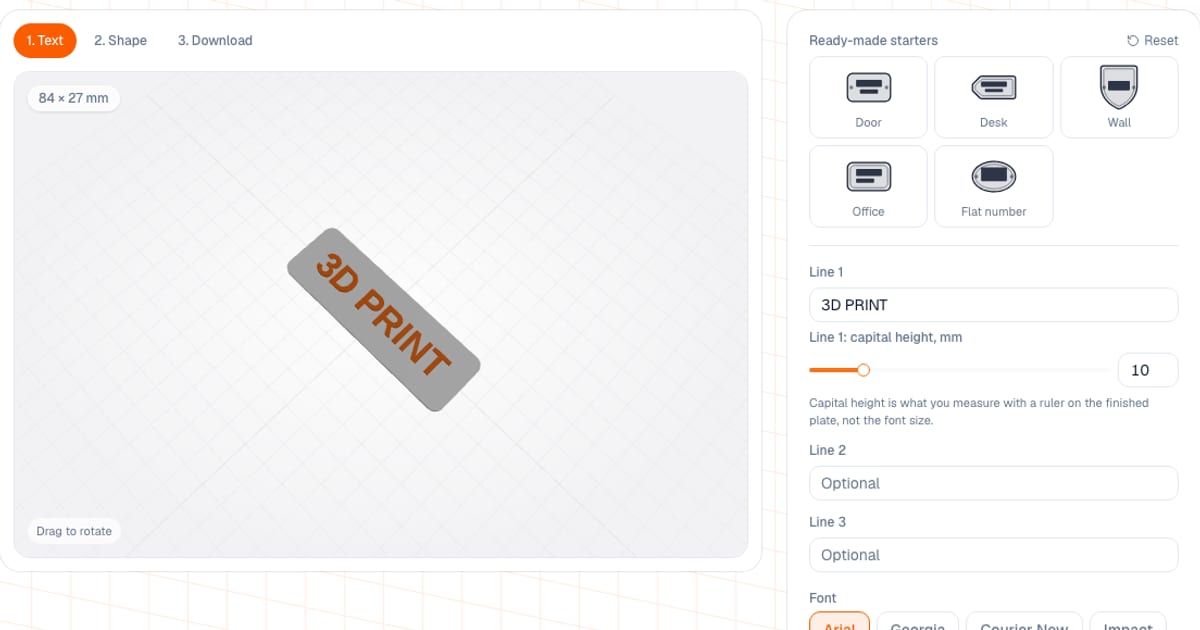
To make a 3D printable name plate online, open the name plate generator, type up to three lines of text, pick a shape and letter height, and download the model as STL or 3MF. It is free and runs in your browser: setup and preview need no account, while downloading the file needs a free sign-in with your email. Your text stays in the browser.
It covers a door sign, a flat number, a desk name plate and a small badge for a box: the Label and Shield shapes are made for that.
How do I make a name plate: five steps
- Open the generator and pick a preset (Door, Desk, Wall, Office, Flat number) or start from scratch.
- Type your text: up to three lines, up to 24 characters each. Choose a font and the capital letter height.
- On the Shape step choose the plate shape, margin around the text, base thickness and relief height, and turn on a border and mounting holes if you need them.
- Check the preview and the warnings: the generator flags text that is too small, relief that is too low and a size that is too large.
- On the Download step take STL, 3MF or “3MF · 2 colors”. Dimensions, triangle count and an approximate filament weight are shown there.
What can I configure?
| Parameter | Range | Default |
|---|---|---|
| Capital height, line 1 | 4–40 mm | 10 mm |
| Capital height, lines 2 and 3 | 3–40 mm | 7 and 5 mm |
| Letter spacing | −1 to 6 mm | 0 |
| Margin from letters to edge | 2–30 mm | 8 mm |
| Base thickness | 0.8–6 mm | 2 mm |
| Relief height | 0.4–4 mm | 1.2 mm |
| Corner radius (rectangle only) | 0–30 mm | 4 mm |
| Mounting hole diameter | 2–8 mm | 4 mm |
| Border width | 0.8–4 mm | 1.2 mm |
| Border inset from the edge | 1–8 mm | 2 mm |
“Letter height” means the height of capital letters, what you would measure with a ruler on the finished plate, not the font size. There are nine shapes: rectangle, circle, oval, hexagon, octagon, shield, house, label and cloud. There are six fonts: Arial, Georgia, Courier New, Impact, Verdana and Times New Roman. The names are familiar, but the letters are not drawn from those files: they come from free look-alike fonts (Arial from Arimo, Times New Roman from Tinos, Courier New from Cousine, Georgia from PT Serif, Verdana from PT Sans, Impact from Oswald), always in a bold weight. Text in other scripts, such as Cyrillic, works too.
What presets are there and how big do the plates come out?
The plate size adapts to the text, margin and holes, so the numbers depend on the sample text. I checked what the presets produce with their sample texts:
| Preset | Shape | Sample text | Size, mm | Line 1 capitals, mm | Base / relief, mm | Weight, ≈ g PLA |
|---|---|---|---|---|---|---|
| Door | rounded rectangle | Smith, Family | 78 × 47 | 12 | 3 / 1.2 | 14 |
| Desk | label | John Smith, Director | 100 × 40 | 9 | 4 / 1 | 20 |
| Wall | shield | Workshop | 158 × 110 | 16 | 4 / 1.6 | 76 |
| Office | rounded rectangle, left-aligned | Room 12, Accounting | 93 × 45 | 12 | 3 / 1.2 | 17 |
| Flat number | oval | 42 | 77 × 61 | 24 | 3 / 1.5 | 15 |
Mounting holes come with Door (4 mm), Wall (5 mm) and Flat number (4 mm); a border comes with Desk, Wall, Office and Flat number. The weight is the generator’s own estimate for a solid PLA model; the real figure depends on infill.
Raised text or inverted: which to choose?
By default the text is raised: the letters stand above the base by the relief height. It reads through the shadow along the edges and looks good in two colors. The Invert mode works the other way round: the background is raised and the letters stay as windows at base level. When inverted, the border becomes a groove, and if the letters of the chosen font overlap, the generator spreads them slightly (and warns you), because overlapping windows cannot be cut. Raised text is the classic relief and the default; inverting gives a plate with a smooth top face and recessed lettering.
How do I print a name plate?
- Orientation. The plate lies flat with the relief facing up. No supports are needed because there are no overhangs.
- Layer height. 0.16–0.2 mm is enough. A 1.2 mm relief at 0.2 mm layers is six layers.
- Infill. 15–20%: on a 2–4 mm plate the perimeters and top layers make up most of the weight.
- Material. PLA is fine indoors. For an entrance door, outdoors or a sunny windowsill use PETG or ASA; ASA resists UV but is best printed in an enclosed printer with ventilation. A comparison is in PLA, PETG, ABS and ASA.
- Mounting. The holes are through-holes on the sides. Pick a screw or anchor that matches the hole diameter (4–5 mm in the presets). For a door you can skip the holes and use double-sided tape.
- Wide ABS or ASA plates tend to lift at the corners. It happens less often with PLA and PETG.
How do I make a two-color name plate?
Download “3MF · 2 colors” and open it in Bambu Studio or OrcaSlicer: the base lands on filament 1 and the relief (letters and border) on filament 2, so you only need to pick filaments. You can choose the colors in the generator beforehand and the preview shows both parts. A high-contrast pair such as a white base and black letters reads best.
Without an AMS, download the regular STL or 3MF and add a filament change (pause) in the slicer at the first layer above the top of the base. The generator shows the height: 3 mm for Door, Office and Flat number, 4 mm for Desk and Wall. Everything above it prints in the second color. With Invert on, the colors swap places: the letters take the base color and the background takes the relief color.
What mistakes ruin a name plate?
- Letters that are too small. Below 3 mm, capitals read poorly with a 0.4 mm nozzle, and the generator warns you. For a sign that must be read from a meter away, use 10–12 mm and up, as the presets do.
- Relief that is too low. Below 0.4 mm it is one or two layers and the text barely shows.
- Text that is too long. The plate grows with the text, but above 250 mm the generator warns and does not shrink the model: check that it fits on your bed.
- A hole right next to the letters. The generator grows the plate until there is 1.5 mm between a hole and the letters, so the text will not touch the fixing.
- Mixing up letter height. It is the height of capitals, not the font size, so lowercase letters come out shorter.
How does it compare with Tinkercad and other options?
- Tinkercad (Autodesk’s free browser CAD) gives you full freedom: any shape, logos, SVG import, as many layers as you like. But you assemble the plate by hand from a text shape and a box and fit the dimensions yourself. If you need a logo or an icon, it is the better pick: my generator inserts text only, with no icons, SVG or custom fonts.
- Parametric customizers (for example on Thingiverse or in MakerLab) suit you if you want one specific ready-made shape: you can tune it, but fonts and non-Latin support depend on the model’s author.
- MakerLab (MakerWorld) and StencilCut are good for keychains from an image and for SVG to 3D. For a line or three of text they are overkill.
- This generator is handy when you need a name plate with text in a few minutes: nine shapes, a border, holes, presets, a two-color 3MF in one click, and nothing to install.
What next?
If you need a keychain with a name, see the keychain generator; for a pet there is the pet tag (see a 3D printed pet address tag); for garden beds a plant marker; for a link or Wi-Fi a QR plate. To estimate the price, the Download step has an “Estimate the cost” button that opens the calculator with a weight estimate.
Frequently asked questions
- How do I make a 3D printable name plate online for free?
- Open the name plate generator, type up to three lines of text, pick a font, shape and letter height, and check the preview. Then download an STL or 3MF and print it. Setup and preview work without an account, and downloading the file needs a free sign-in with your email.
- How do I make a door sign on a 3D printer?
- Pick the Door preset: a rounded rectangle with two 4 mm mounting holes, 12 mm letters, a 3 mm base and 1.2 mm relief. With the text Smith and Family it comes out at about 78 × 47 mm. For a door that is outdoors or in direct sun, print it in PETG or ASA.
- Which fonts does the name plate generator have?
- Six: Arial, Georgia, Courier New, Impact, Verdana and Times New Roman. The names are the familiar ones, but the letters are built from free look-alike fonts in a bold weight, and the letter outlines are vector curves, so rounded strokes stay smooth at any size. Cyrillic text works too.
- How many lines and characters can I enter?
- Up to three lines of up to 24 characters each. Every line has its own letter height: line one from 4 to 40 mm of capital height, lines two and three from 3 to 40 mm. Alignment is left, center or right.
- Can I make a two-color name plate without an AMS?
- Yes: download the regular STL or 3MF and add a filament change (pause) in the slicer at the first layer above the top of the base; the generator shows that height, for example 3 mm for the Door preset. With an AMS it is easier: the 3MF with 2 colors splits the model into a base and a relief part.
- How big will the name plate be?
- The plate grows by itself to fit the text, margin and holes. With the preset sample texts it ranges from 77 × 61 mm (flat number 42) to 158 × 110 mm (the wall plate Workshop). If the size goes above 250 mm the generator warns you but does not shrink the model.
- Do I need an account, and is my text uploaded?
- Setup and preview work without an account. Downloading an STL or 3MF needs a free sign-in with your email. The text itself is not sent to a server: the model is built in your browser, and a download only records the shape, font, number of lines and a length range.