
October 7, 2026
3D Print Box Generator: Custom Boxes with Lids as STL (Free)
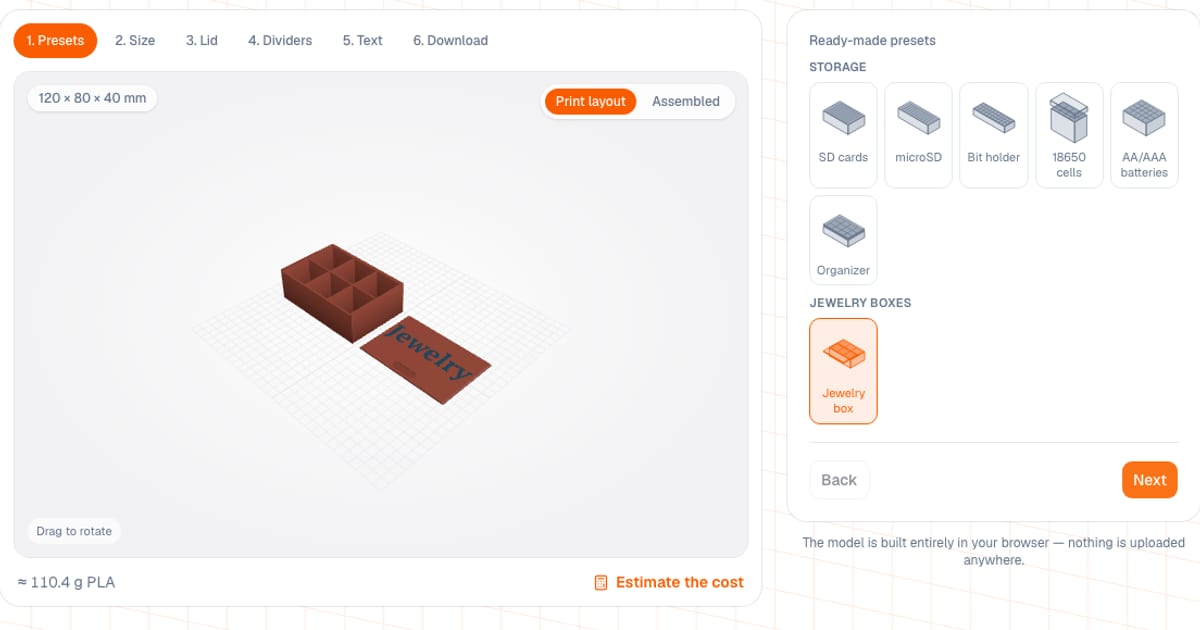
A box generator builds a box with a lid to your size in millimeters and gives you a print-ready STL or 3MF. The Box Generator is free and runs in your browser: setup and preview need no sign-up, and downloading a file needs a free sign-in with an email address. The box and lid download as separate files, already laid out to print without supports.
Plenty of people need the same thing: a box for one specific item, such as memory cards, bits, cells or small parts in a workshop. Finding a ready model often takes longer than building your own. The model is built in your browser and never leaves it.
What can you set in the box generator?
- Size. Width and depth 20-280 mm, height 10-200 mm. The default is 100 x 80 x 40 mm.
- Walls and bottom. Wall 0.8-6 mm (default 2), bottom 0.8-8 mm (default 2), corner radius from 0 mm. The wall can be smooth or ribbed: ribs about 0.6 mm tall at a 6 mm pitch.
- Lid. None, or one of three types: sleeve, snap-fit, sliding. See the table below.
- Dividers. Up to 15 across the width and up to 15 across the depth. They split the space into equal compartments: N dividers per axis give N + 1 compartments. A divider is 80% of the wall thickness, between 0.8 and 2 mm, and a compartment is never narrower than 1.5 mm.
- Finger notch. A cut-out in the front wall of the box, in the skirt of the sleeve lid, or a thumb recess on the sliding lid.
- Lid text. Five fonts (Arial, Georgia, Courier New, Impact, Verdana), depth or height 0.4-2 mm, Cyrillic works.
- Two colors. The 3MF 2 colors button puts the text on a separate part for the second filament.
Which lid should you pick: sleeve, snap-fit or sliding?
| Sleeve | Snap-fit | Sliding | |
|---|---|---|---|
| How it holds | slips over the box with a clearance | bumps on the lip click into a groove in the box wall | slides in dovetail grooves, front wall is lowered |
| Default clearance (range 0.1-0.5 mm) | 0.25 mm | 0.2 mm | 0.3 mm |
| Default size | skirt 12 mm, top 2 mm | lip 6 mm, plate 2 mm | thickness 2 mm, also the groove depth |
| Print position | face down | face down | wide side down |
| Text | engraved | engraved | engraved or raised |
The snap-fit is designed for about 0.35 mm of interference: the lip flexes and locks into the groove. On the sliding lid the corner radius is capped (the tool shows the maximum), otherwise the groove would run into the rounding.
How do you get the file in six steps?
- Open the box generator and pick a preset or go straight to size.
- Set width, depth, height, wall, bottom and corner radius.
- Choose the lid and clearance, and turn on the finger notch if you want it.
- Add dividers across the width and the depth.
- If needed, type the lid text: style, font, depth.
- On the Download step switch the preview between Print layout and Assembled, then download the box and the lid as STL or 3MF.
Under the preview you see an estimated mass (PLA, 15% infill) and an Estimate the cost button that opens the print cost calculator with the mass filled in. The mass is approximate; your slicer gives the exact figure. At about $20 per kg of PLA, the default 100 x 80 x 40 mm box with a sleeve lid (about 85 g by the tool's estimate) is roughly $1.70 of filament.
What sizes do the ready-made boxes have?
Each preset opens from a link and can then be edited like any box. Mass is the tool's own estimate (PLA, 15% infill).
| Preset | Size, mm | Lid | Compartments | Mass, g |
|---|---|---|---|---|
| SD cards | 54 x 36 x 18 | none | 12 slots | about 18 |
| microSD | 38 x 15 x 10 | none | 12 slots | about 6 |
| Bit holder | 102 x 33 x 18 | none | 10 x 3 pockets | about 26 |
| 18650 cells | 89 x 46 x 68 | sleeve, 15 mm | 4 x 2 pockets | about 100 |
| AA and AAA | 87 x 70 x 40 | none | 5 x 4 pockets | about 63 |
| Organizer | 150 x 100 x 35 | snap-fit | 4 x 3 compartments | about 140 |
| Jewelry box | 120 x 80 x 40 | sliding, text "Jewelry" | 3 x 2 compartments | about 110 |
The pockets are sized from real items: an SD card is 32 x 24 x 2.1 mm, a 1/4" bit is 7.3 mm across the corners, an 18650 cell is 18.5 x 65 mm, an AA battery is 14.5 x 50.5 mm. AAA batteries fit the same pockets.
How do you print a box so the lid fits?
- Profile. 0.2 mm layers, 3-4 perimeters, 15-20% infill so the box holds its shape under load. A wall that is a multiple of the line width (1.2, 1.6, 2.0 mm with a 0.4 mm nozzle) prints cleaner than an arbitrary thickness.
- Material. PLA is fine for boxes and sleeve lids. For snap-fit and sliding lids PETG is friendlier: it flexes more and tires less, while PLA on a snap-fit can crack over time.
- Test the clearance. On a new printer or filament, print a small box with the same lid type first and tune the clearance. It depends on the printer and the plastic, so there is no universal number.
- Two colors. With an AMS the 3MF 2 colors file prints as is. Without an AMS, add a filament change in the slicer at the height the tool shows. In that file the parts sit side by side, as in the Print layout preview; if they do not fit your bed, rearrange them in the slicer.
- Bed size. The model is not scaled to your bed. On a 220 x 220 mm printer keep the box smaller than that.
Why won't the lid fit, and other common mistakes
- Lid too tight. Elephant's foot on the first layer shrinks the seat. Add 0.05-0.1 mm of clearance or calibrate the printer.
- Wall too thin. At 0.8 mm that is two passes of a 0.4 mm nozzle and the box comes out flexible. For boxes that get carried, use 1.6-2 mm.
- Dividers stop short of the rim. With a snap-fit or sliding lid they end below the top so they do not collide with the lip or the groove. That is intended.
- Raised text on a sleeve lid. It is not offered: raised text is only available on the sliding lid, the other lids print face down.
- Expecting cardboard-style boxes. These boxes are rectangular, the dividers are straight and evenly spaced, and there are no hinges.
Can this generator make laser-cut or cardboard boxes?
No. This is a generator for 3D printing: the output is STL and 3MF, not DXF, SVG or a cutting layout. For laser cutting look at Boxes.py and MakerCase; for cardboard packaging, dieline services. I am not trying to replace them.
How is it different from ready models and CAD?
- Ready models on Printables, MakerWorld or Thingiverse are better when you need a specific well-known item and the size matches. You cannot fit your own size without editing the model.
- OpenSCAD, Fusion or Tinkercad give more freedom: hinges, uneven compartments, unusual shapes. But they take skill and time. Here everything is simpler and more limited: three lid types, a rectangular shape, equal compartments.
- Gridfinity has its own tool; it is no longer a mode in the box generator.
If you need modular bins that fit a drawer, open the Gridfinity generator: it works out the grid from your drawer size. For wall storage there is the SKÅDIS panel. You can label a box with the nameplate generator or the keychain generator. If a file does not print the way you expect, see how to tell if your STL is broken.
Frequently asked questions
- How do I make a 3D printable box with a lid online?
- Open the box generator, enter the size in millimeters, pick a lid (sleeve, snap-fit or sliding), add dividers and download the STL or 3MF. Setup and preview are free with no sign-up; downloading the file needs a free sign-in with an email address.
- What size can the box be?
- Width and depth from 20 to 280 mm, height from 10 to 200 mm, walls 0.8-6 mm, bottom 0.8-8 mm. The model is not scaled to your bed, so on a 220 mm printer keep the box smaller than that.
- What clearance should a 3D printed lid have?
- The defaults are 0.25 mm for the sleeve lid, 0.2 mm for snap-fit and 0.3 mm for the sliding lid; you can set 0.1-0.5 mm. If the lid is too tight, add 0.05-0.1 mm; if it rattles, take some off.
- Can I print the box and the lid without supports?
- Yes. Parts download already in print position: the box stands on its bottom, the sleeve and snap-fit lids lie face down, the sliding lid lies on its wide side. No supports are needed.
- How do I put text on the lid in a second color?
- Engraved text works on any lid, raised text only on the sliding lid. The 3MF 2 colors button puts the text on a separate part for filament 2. Raised text on a printer without an AMS needs one filament change at the height shown; engraved text in a second color needs an AMS.
- Are there ready-made boxes for SD cards, bits and batteries?
- Yes, seven presets: SD cards, microSD, a bit holder, 18650 cells, AA and AAA batteries, a small-parts organizer and a jewelry box with a sliding lid. Each opens from a link and can be edited like any other box.
- Where is the Gridfinity mode in the box generator?
- It moved out: Gridfinity is now a separate tool that fits the grid to your drawer size and splits the baseplate into tiles for your printer bed.