
October 7, 2026
Which 3D Printer Should I Buy? Free Picker by Budget and Use
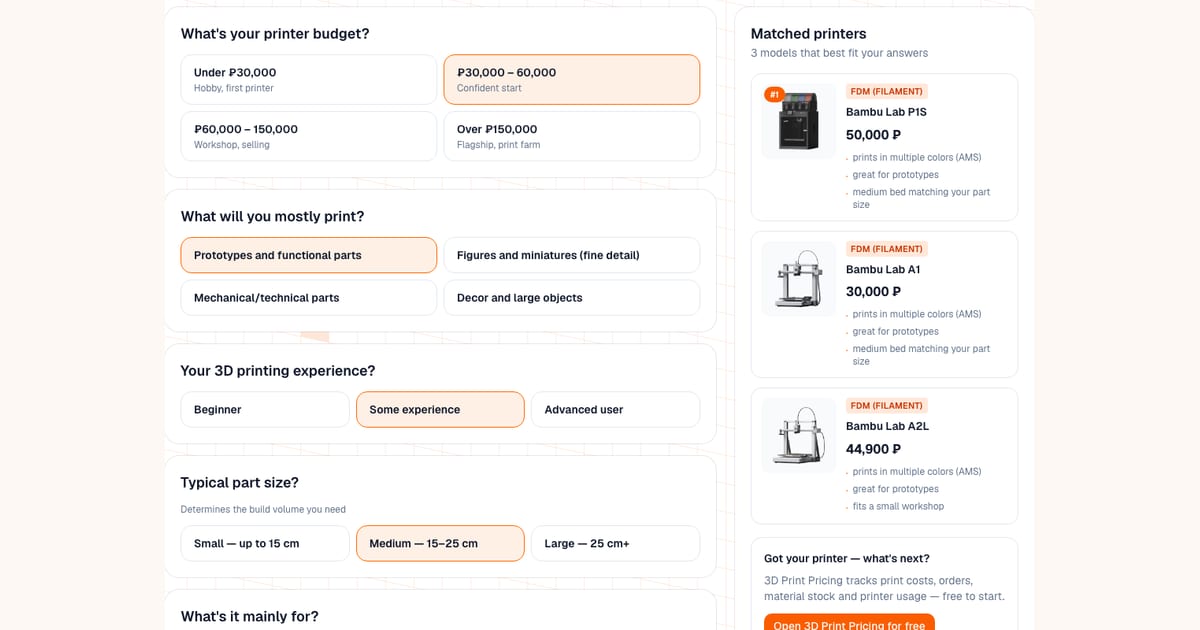
There is no single answer to “which 3D printer should I buy”: it depends on your budget, what you print, how big the parts are and how much experience you have. I built a free 3D printer picker that asks six questions and shows three matching printers from a catalog of 16 (10 FDM and 6 resin) with prices and a short reason for each pick. It runs in the browser with no sign-up, and under the hood it is a simple scoring system, not a neural network.
One thing to know up front: prices in the picker are approximate Russian retail prices in rubles. For a reader elsewhere they are best read as a ladder, not a price list: the Bambu Lab A1 mini (24,000) costs less than the A1 (30,000), which costs less than the P1S (50,000). Check the current price in your own market.
What does the picker recommend in typical situations?
Here is what the picker returns for six typical sets of answers (as of October 7, 2026; if the catalog changes, the results may too):
| Answers in the picker | Suggested, in order |
|---|---|
| Beginner, hobby, lowest budget tier, small parts, prototypes, one color | Creality Ender 3 V3 SE, Bambu Lab A1 mini, Bambu Lab A1 |
| Same, but multicolor needed, goal “decor” | Bambu Lab A1 mini, Bambu Lab A1, Creality Ender 3 V3 SE |
| Same as the first row, but the goal is “figures and miniatures” | Elegoo Mars 5, Anycubic Photon Mono 4, Bambu Lab A1 mini |
| Decor and large objects, second budget tier, hobby, beginner, multicolor, large parts | Bambu Lab A2L, Bambu Lab P1S, Bambu Lab A1 |
| Technical parts, third budget tier, workshop, some experience, medium parts, one color | Creality K1, Bambu Lab X1 Carbon, Bambu Lab P1S |
| Series of technical parts, top budget tier, print farm, advanced, large parts, one color | Creality K2 Plus, Creality K1 Max, Creality K1 |
Look at the fifth row: in the ₽60,000–150,000 tier the picker also suggested the K1 at 55,900 and the P1S at 50,000. Budget works as a ceiling, not a range, so everything cheaper than the upper bound is still a candidate.
What does the picker ask?
- Budget: under ₽30,000, ₽30,000–60,000, ₽60,000–150,000, or over ₽150,000.
- Goals: prototypes and functional parts, figures and miniatures, mechanical parts, decor and large objects.
- Experience: beginner, some experience, advanced.
- Typical part size: up to 15 cm, 15–25 cm or 25 cm and more. This sets the bed size you need.
- Use: personal hobby, small sales or a workshop, a print farm.
- Multicolor: whether you need printing in several colors. The tool reminds you that an AMS or multi-extruder adds to price and print time.
How are the points calculated?
Budget is a hard filter: a model above the upper bound of your tier never appears. The rest adds up from points:
| Criterion | Points |
|---|---|
| Multicolor needed and the printer supports it | +4 (resin printers are excluded outright) |
| Multicolor not needed and the printer is single-color | +1 |
| Your goal matches what the model is good at | +3 |
| Beginner and the model is marked easy | +3 (advanced users get +1 for a non-beginner model) |
| Bed class matches your part size | +2 |
| Use matches (hobby, workshop, farm) | +2 |
| Price closer to the top of the budget | up to +1.5 |
The three best-scoring models are shown. The last criterion is deliberately soft: for the same money the picker prefers a better-equipped model over the cheapest one.
Which printers are in the catalog?
| Model | Technology | Price in the picker, ₽ | Bed | Multicolor | Beginner-friendly |
|---|---|---|---|---|---|
| Creality Ender 3 V3 SE | FDM | 20,900 | small | no | yes |
| Bambu Lab A1 mini | FDM | 24,000 | small | yes | yes |
| Bambu Lab A1 | FDM | 30,000 | medium | yes | yes |
| Anycubic Kobra 2 Pro | FDM | 30,900 | medium | no | yes |
| Bambu Lab A2L | FDM | 44,900 | large | yes | yes |
| Bambu Lab P1S | FDM | 50,000 | medium | yes | yes |
| Creality K1 | FDM | 55,900 | medium | no | no |
| Creality K1 Max | FDM | 79,990 | large | no | no |
| Bambu Lab X1 Carbon | FDM | 120,000 | medium | yes | no |
| Creality K2 Plus | FDM | 129,999 | large | no | no |
| Anycubic Photon Mono 4 | Resin (SLA) | 15,000 | small | no | yes |
| Elegoo Mars 5 | Resin (SLA) | 18,500 | small | no | yes |
| Creality HALOT-MAGE | Resin (SLA) | 42,000 | medium | no | yes |
| Anycubic Photon Mono M7 Pro | Resin (SLA) | 56,000 | medium | no | no |
| Elegoo Saturn 4 Ultra | Resin (SLA) | 65,000 | large | no | no |
| Elegoo Jupiter SE | Resin (SLA) | 120,000 | large | no | no |
This is a curated list, not the whole market. The bed class and the “beginner-friendly” and “multicolor” flags are the tool’s own classification from the manufacturers’ public specs. Exact build volumes for some of them: Bambu Lab A1 mini 180 × 180 × 180 mm, A1, P1S and X1 Carbon 256 × 256 × 256 mm, A2L 330 × 320 × 325 mm, Creality Ender 3 V3 SE 220 × 220 × 250 mm, K2 Plus 350 × 350 × 350 mm. For the rest, see the 3D printer reference.
Which 3D printer is best for batch printing?
Choose “print farm, mass production” in the use question and the picker favors models tagged for it: the Creality K1, K1 Max and K2 Plus, the Bambu Lab X1 Carbon, and among resin printers the Elegoo Saturn 4 Ultra and Jupiter SE. For batches, a larger bed fits more parts per plate, and reliability decides how often you have to intervene. Operator time often becomes the bottleneck before printer count does, which I covered in why print farms stop scaling. To price a run, see how to price a batch.
What should I look at besides price?
- Bed size. A part that does not fit has to be cut and glued. Measure the biggest thing you plan to print and leave some margin.
- Enclosure. The open-frame A1 mini and A1 are comfortable with PLA, PETG and TPU, while ABS and ASA are better in an enclosed chamber like the P1S or X1 Carbon.
- Multicolor. It adds to price and print time, and every color change sends some filament to the purge. Decide whether you need it before buying.
- Consumables. A resin printer costs more to run than it looks: isopropyl alcohol for washing, a UV curing station, gloves and ventilation. I compare the two technologies in FDM vs SLA: which printer to start a print-on-demand business with.
- Depreciation and electricity. A printer wears out with every hour it runs, which belongs in your prices. The formula is in 3D printer depreciation, and real consumption figures are in how much electricity a 3D printer uses.
What is the lifespan of a 3D printer?
There is no single official number; it depends on the model, workload and maintenance. For depreciation, the calculator presets assume 10,000 hours for FDM printers and 25,000–30,000 hours for resin printers. That is a planning assumption, not a manufacturer guarantee. On resin printers the screen and FEP film are consumables replaced separately (see LCD printer maintenance), and on FDM the nozzle wears, especially with abrasive filaments (nozzle wear). Base your own estimate on experience with the specific model.
What mistakes do people make when choosing?
- Buying the fastest printer first. Speed is not the priority for a first machine: a failed print at high speed costs more, and a beginner benefits more from predictability.
- Buying resin “for detail” without counting the extras. If you print large functional parts, you do not need resin.
- Taking the smallest bed to save money. A month later the parts no longer fit and a second printer is needed.
- Buying the cheapest model for a workshop. With active order printing its lifespan is used up quickly and has to be priced into orders.
- Choosing a printer for a child by the same criteria. Safety and ease of learning matter most there, see the best 3D printer for a kid.
When will the picker not help, and what to use instead?
The picker answers a narrow question honestly: what fits from 16 models given your answers. It does not know the whole market (there are no Prusa printers in the catalog, for example), it does not compare print quality between models, and it shows approximate Russian prices. If you are deciding between two specific models, a direct comparison is better: I have written up the Bambu Lab A1 mini, A1 and A2L and the P1S and P2S. For first-hand reports on a specific unit, check owner communities such as r/3Dprinting and video tests. For a catalog of printers with detailed specs, open the 3D printer reference.
What next?
Once you have picked a printer, work out how many orders it takes to pay off: the print cost calculator accounts for the depreciation of the specific model, electricity and filament. To estimate the power bill in advance, there is an electricity cost calculator.
Calculate your price in a minute
Free calculator: part weight, print time, material price — no sign-up needed.
 App Store
 Google Play
 RuStore
Frequently asked questions
- Which 3D printer should a beginner buy?
- For a first printer on the lowest budget tier, the picker suggests the Creality Ender 3 V3 SE and the Bambu Lab A1 mini; both are marked easy for beginners. The A1 mini is simpler to learn and can print in several colors with an AMS, while the Ender 3 V3 SE has a larger 220 × 220 mm bed.
- Which 3D printer is best for home and hobby use?
- For home use a FDM printer with a 180–256 mm bed is usually enough, for example the Bambu Lab A1 mini or A1, the Creality Ender 3 V3 SE or the Anycubic Kobra 2 Pro. A resin printer only makes sense if you print miniatures and small parts with very fine detail, and it needs ventilation and hand protection.
- What is the difference between FDM and resin (SLA) printers?
- FDM melts filament and suits functional parts, enclosures and large decor. SLA cures liquid resin with light and gives much finer detail, but needs washing in alcohol, post-curing and protective gear. Resin is the usual choice for miniatures, FDM for almost everything else.
- Is this printer picker powered by AI?
- No. It is a simple point-scoring system over a curated list of 16 models (10 FDM and 6 resin). Budget is a hard filter, every other answer adds points for a match, and the three best-scoring models are shown.
- Where do the printer prices in the picker come from?
- They are approximate Russian retail prices in rubles, the same as in the printer presets of the site's cost calculator. Prices differ between sellers and change over time, so check the current price in your own market before buying.
- What is the lifespan of a 3D printer?
- There is no single official number; it depends on the model, workload and maintenance. For depreciation, the calculator presets assume 10,000 hours for FDM printers and 25,000–30,000 hours for resin printers. That is a planning assumption, not a manufacturer guarantee.
- Which 3D printer is best for batch printing?
- For serial printing the picker offers models tagged for print farms: the Creality K1, K1 Max and K2 Plus, the Bambu Lab X1 Carbon, and among resin printers the Elegoo Saturn 4 Ultra and Jupiter SE. For batches, bed size, reliability and how much of your time each plate takes matter more than top speed.